This time we’re going bigger than ever. Fabric, Power BI, SQL, AI and more. We're covering it all. You won't want to miss it.
Learn moreDid you hear? There's a new SQL AI Developer certification (DP-800). Start preparing now and be one of the first to get certified. Register now
Hi All,
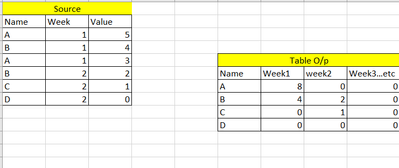
I am trying to obtain similar solution as shown below in Table visualization. I know I can do with matrix visualization easily but I have other calculated measures I need to add to this so I am doing in Table visual. To be precise I am looking for current week and going forward. Can you please help me.
Thanks
Sush
Solved! Go to Solution.
To do that, you would need to create separate measures for each column like this
Week 1 = CALCULATE([Your Measure], Source[Week] = 1)
Week 2 = CALCULATE([Your Measure], Source[Week] = 2)
If this works for you, please mark it as the solution. Kudos are appreciated too. Please let me know if not.
Regards,
Pat
To learn more about Power BI, follow me on Twitter or subscribe on YouTube.
Hi @Anonymous,
You can take a look at the following blog about pivot column to expand your value fields to columns if they meet to your requirement:
The New Pivot Column option in Power Query
Regards,
Xiaoxin Sheng
To do that, you would need to create separate measures for each column like this
Week 1 = CALCULATE([Your Measure], Source[Week] = 1)
Week 2 = CALCULATE([Your Measure], Source[Week] = 2)
If this works for you, please mark it as the solution. Kudos are appreciated too. Please let me know if not.
Regards,
Pat
To learn more about Power BI, follow me on Twitter or subscribe on YouTube.
This works. Thankyou! I was also looking for date for column name instead of week1, week 2 etc. like Aug 17 , Aug 24. Do you know how can i do it dynamic.
I don't think you can dynamically name your measure, but you could provide the Week Date in the result concatenated with the result (e.g., <Date expression> & " - " & CALCULATE(...), but that probably isn't what you are looking for.
If this works for you, please mark it as the solution. Kudos are appreciated too. Please let me know if not.
Regards,
Pat
To learn more about Power BI, follow me on Twitter or subscribe on YouTube.
Check out the April 2026 Power BI update to learn about new features.
Sign up to receive a private message when registration opens and key events begin.
If you have recently started exploring Fabric, we'd love to hear how it's going. Your feedback can help with product improvements.
| User | Count |
|---|---|
| 36 | |
| 33 | |
| 31 | |
| 21 | |
| 16 |
| User | Count |
|---|---|
| 66 | |
| 55 | |
| 31 | |
| 24 | |
| 23 |