cancel
Showing results for 
Search instead for 
Did you mean: 

The Power BI Data Visualization World Championships is back! Get ahead of the game and start preparing now! Learn more

Reply
Anonymous
Not applicable

Table Visualization

Hi All,

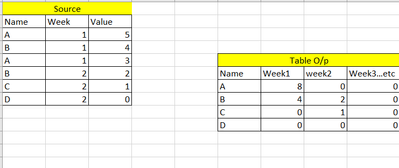
I am trying to obtain similar solution as shown below in Table visualization. I know I can do with matrix visualization easily but I have other calculated measures I need to add to this so I am doing in Table visual. To be precise I am looking for current week and going forward. Can you please help me.


susheel1347_0-1597358132410.png


Thanks

Sush

1 ACCEPTED SOLUTION
mahoneypat
Microsoft Employee
Microsoft Employee

To do that, you would need to create separate measures for each column like this


Week 1 = CALCULATE([Your Measure], Source[Week] = 1)

Week 2 = CALCULATE([Your Measure], Source[Week] = 2)


If this works for you, please mark it as the solution.  Kudos are appreciated too.  Please let me know if not.

Regards,

Pat


Did I answer your question? Mark my post as a solution! Kudos are also appreciated!

To learn more about Power BI, follow me on Twitter or subscribe on YouTube.


@mahoneypa HoosierBI on YouTube


View solution in original post

5 REPLIES 5
Anonymous
Not applicable

Hi @Anonymous,

You can take a look at the following blog about pivot column to expand your value fields to columns if they meet to your requirement:

The New Pivot Column option in Power Query 

Regards,
Xiaoxin Sheng

mahoneypat
Microsoft Employee
Microsoft Employee

To do that, you would need to create separate measures for each column like this


Week 1 = CALCULATE([Your Measure], Source[Week] = 1)

Week 2 = CALCULATE([Your Measure], Source[Week] = 2)


If this works for you, please mark it as the solution.  Kudos are appreciated too.  Please let me know if not.

Regards,

Pat


Did I answer your question? Mark my post as a solution! Kudos are also appreciated!

To learn more about Power BI, follow me on Twitter or subscribe on YouTube.


@mahoneypa HoosierBI on YouTube


Anonymous
Not applicable

@mahoneypat -

This works. Thankyou! I was also looking for date for column name instead of week1, week 2 etc. like Aug 17 , Aug  24. Do you know how can i do it dynamic.

I don't think you can dynamically name your measure, but you could provide the Week Date in the result concatenated with the result (e.g., <Date expression> & " - " & CALCULATE(...), but that probably isn't what you are looking for.


If this works for you, please mark it as the solution.  Kudos are appreciated too.  Please let me know if not.

Regards,

Pat


Did I answer your question? Mark my post as a solution! Kudos are also appreciated!

To learn more about Power BI, follow me on Twitter or subscribe on YouTube.


@mahoneypa HoosierBI on YouTube


Anonymous
Not applicable

@mahoneypat - Sure will try it. Thanks!

Helpful resources

Announcements
Power BI DataViz World Championships

Power BI Dataviz World Championships

The Power BI Data Visualization World Championships is back! Get ahead of the game and start preparing now!

December 2025 Power BI Update Carousel

Power BI Monthly Update - December 2025

Check out the December 2025 Power BI Holiday Recap!

FabCon Atlanta 2026 carousel

FabCon Atlanta 2026

Join us at FabCon Atlanta, March 16-20, for the ultimate Fabric, Power BI, AI and SQL community-led event. Save $200 with code FABCOMM.