A new Data Days event is coming soon!
This time we’re going bigger than ever. Fabric, Power BI, SQL, AI and more. We're covering it all. You won't want to miss it.
Learn more- Power BI forums
- Get Help with Power BI
- Desktop
- Service
- Report Server
- Power Query
- Mobile Apps
- Developer
- DAX Commands and Tips
- Custom Visuals Development Discussion
- Health and Life Sciences
- Power BI Spanish forums
- Translated Spanish Desktop
- Training and Consulting
- Instructor Led Training
- Dashboard in a Day for Women, by Women
- Galleries
- Data Stories Gallery
- Themes Gallery
- Contests Gallery
- QuickViz Gallery
- Quick Measures Gallery
- Visual Calculations Gallery
- Notebook Gallery
- Translytical Task Flow Gallery
- TMDL Gallery
- R Script Showcase
- Webinars and Video Gallery
- Ideas
- Custom Visuals Ideas (read-only)
- Issues
- Issues
- Events
- Upcoming Events
Level up your Power BI skills this month - build one visual each week and tell better stories with data! Get started
- Power BI forums
- Forums
- Get Help with Power BI
- Desktop
- Re: Table Visualization from 2 different tables
- Subscribe to RSS Feed
- Mark Topic as New
- Mark Topic as Read
- Float this Topic for Current User
- Bookmark
- Subscribe
- Printer Friendly Page


- Mark as New
- Bookmark
- Subscribe
- Mute
- Subscribe to RSS Feed
- Permalink
- Report Inappropriate Content
Table Visualization from 2 different tables
Hello Folks,
GM.
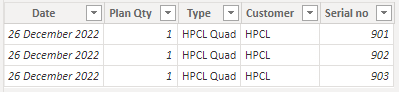
I am developing a production data display whereas data comes from 2 different tables.
I would like consolidate in one matrix/table visualization as below
Expected format (Filer applied as today) :
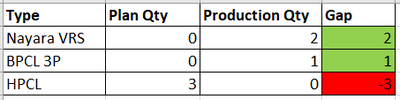
Input files : Table 1
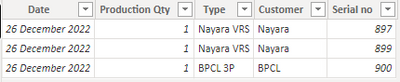
Table 2 :
Can anybody help me, how to do this?
Thanks a lot in advance.


- Mark as New
- Bookmark
- Subscribe
- Mute
- Subscribe to RSS Feed
- Permalink
- Report Inappropriate Content
Hi,
Here's my suggestion
- Rename the Qty columns to Quantity in both tables
- Insert Type column with entries as Production and Plan in each table
- Append the tables
- Write these measures
- Pl_qty = sum(Data[Plan])
- Pr_qty = sum(Data[Production])
- Gap = [Pr_qty]-[Pl_qty]
Hope this helps.
Regards,
Ashish Mathur
http://www.ashishmathur.com
https://www.linkedin.com/in/excelenthusiasts/

- Mark as New
- Bookmark
- Subscribe
- Mute
- Subscribe to RSS Feed
- Permalink
- Report Inappropriate Content
Hi @Karthik12 ,
Here are the steps you can follow:
1. Create calculated column.
Production Qty =
COUNTX(FILTER(
    ALL('Table1'),
    CONTAINSSTRING(
    CONCATENATEX(
    'Table1','Table1'[Type],","),'Table'[Type])=TRUE()
    &&
    'Table1'[Type]=EARLIER('Table'[Type])
    ),[Type])
Plan Qty =
COUNTX(FILTER(
ALL('Table2'),
CONTAINSSTRING(
CONCATENATEX(
'Table2','Table2'[Type],","),
'Table'[Type]
)=TRUE()
&&
'Table2'[Customer]=EARLIER('Table'[Type])
),'Table2'[Type])Gap =
[Production Qty] - [Plan Qty]
2. Create measure.
Flag =
IF(
    MAX('Table'[Gap] ) <0,"red","green")
3. [Gap] – Conditional formatting – Background color.


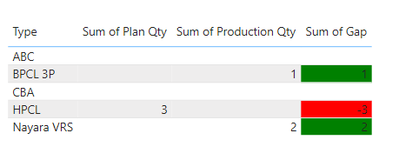
4. Result:
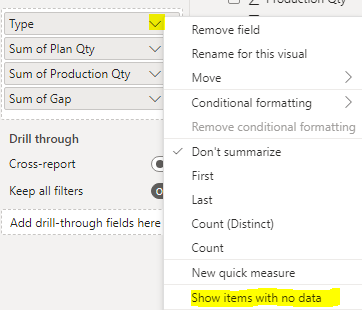
When your entire Row is null, it will automatically default not to display.
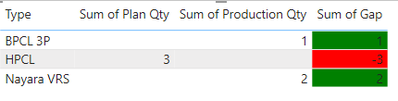
If you want to display null values, you can click Show items with no data.
Best Regards,
Liu Yang
If this post helps, then please consider Accept it as the solution to help the other members find it more quickly
- Mark as New
- Bookmark
- Subscribe
- Mute
- Subscribe to RSS Feed
- Permalink
- Report Inappropriate Content
@Anonymous Hi , Thanks for your time.
It working fine but we have plan qty and prod qty is more than 1 (in table 1 and table 2) means this logic not working.
Is there any solution for that?


- Mark as New
- Bookmark
- Subscribe
- Mute
- Subscribe to RSS Feed
- Permalink
- Report Inappropriate Content
@Karthik12 multiple ways of doing it you can do it by relationship or merging the tables.
The below posts will guide you in the right direction.
https://community.powerbi.com/t5/Desktop/Joining-contents-of-two-tables-into-one-new-table/m-p/39775
https://curbal.com/curbal-learning-portal/joining-tables-in-power-bi-with-power-query-and-dax

- Mark as New
- Bookmark
- Subscribe
- Mute
- Subscribe to RSS Feed
- Permalink
- Report Inappropriate Content
Hi,
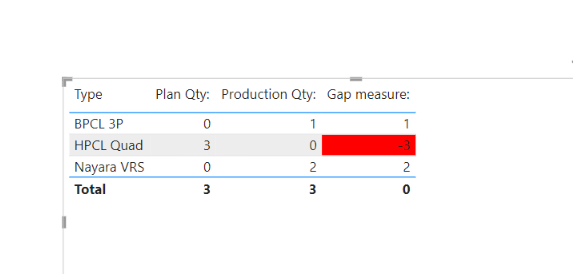
I am not sure how your datamodel looks like, but I tried to create a sample pbix file like below.
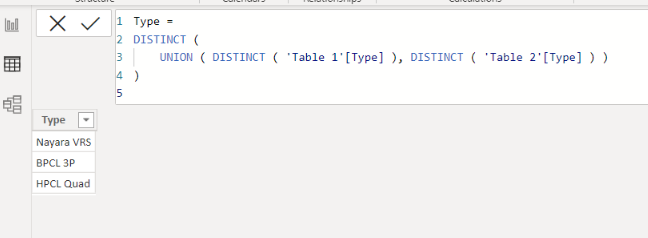
One of ways to solve this is to create a Type dimension table like below.
I hope the below can provide some ideas on how to create a solution for your datamodel.

If this post helps, then please consider accepting it as the solution to help other members find it faster, and give a big thumbs up.
Click here to visit my LinkedIn page
- Mark as New
- Bookmark
- Subscribe
- Mute
- Subscribe to RSS Feed
- Permalink
- Report Inappropriate Content
@Jihwan_Kim I working for me. Thank you !🙂
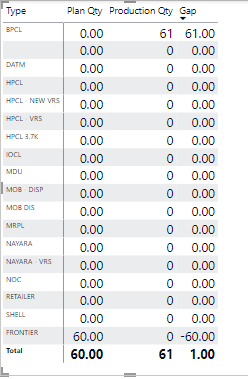
But only thing, If Gap color is not working. If Gap > 0, it should be green, <0, it should RED.
Can you please check?
Also, my table has lot of other names like below
Is it possible to show only rows which has either plan or prod qty numbers?
- Mark as New
- Bookmark
- Subscribe
- Mute
- Subscribe to RSS Feed
- Permalink
- Report Inappropriate Content
Hi,
Thank you for your feedback.
Please share your sample pbix file's link (onedrive or others), and then I can try to look into it to come up with a more accurate solution.
Thanks.
If this post helps, then please consider accepting it as the solution to help other members find it faster, and give a big thumbs up.
Click here to visit my LinkedIn page
- Mark as New
- Bookmark
- Subscribe
- Mute
- Subscribe to RSS Feed
- Permalink
- Report Inappropriate Content
Hi,
Please find the one drive link
Helpful resources

Power BI Monthly Update - April 2026
Check out the April 2026 Power BI update to learn about new features.

Data Days 2026 coming soon!
Sign up to receive a private message when registration opens and key events begin.

New to Fabric Survey
If you have recently started exploring Fabric, we'd love to hear how it's going. Your feedback can help with product improvements.

Power BI DataViz World Championships - June 2026
A new Power BI DataViz World Championship is coming this June! Don't miss out on submitting your entry.

| User | Count |
|---|---|
| 30 | |
| 24 | |
| 23 | |
| 17 | |
| 15 |


| User | Count |
|---|---|
| 61 | |
| 36 | |
| 29 | |
| 22 | |
| 22 |


