A new Data Days event is coming soon!
This time we’re going bigger than ever. Fabric, Power BI, SQL, AI and more. We're covering it all. You won't want to miss it.
Learn more- Power BI forums
- Get Help with Power BI
- Desktop
- Service
- Report Server
- Power Query
- Mobile Apps
- Developer
- DAX Commands and Tips
- Custom Visuals Development Discussion
- Health and Life Sciences
- Power BI Spanish forums
- Translated Spanish Desktop
- Training and Consulting
- Instructor Led Training
- Dashboard in a Day for Women, by Women
- Galleries
- Data Stories Gallery
- Themes Gallery
- Contests Gallery
- QuickViz Gallery
- Quick Measures Gallery
- Visual Calculations Gallery
- Notebook Gallery
- Translytical Task Flow Gallery
- TMDL Gallery
- R Script Showcase
- Webinars and Video Gallery
- Ideas
- Custom Visuals Ideas (read-only)
- Issues
- Issues
- Events
- Upcoming Events
Get Fabric Certified for FREE during AI Skills Fest. This week only. Secure your voucher now.
- Power BI forums
- Forums
- Get Help with Power BI
- Desktop
- Re: Table Visual Filtering
- Subscribe to RSS Feed
- Mark Topic as New
- Mark Topic as Read
- Float this Topic for Current User
- Bookmark
- Subscribe
- Printer Friendly Page


- Mark as New
- Bookmark
- Subscribe
- Mute
- Subscribe to RSS Feed
- Permalink
- Report Inappropriate Content
Table Visual Filtering
I've had a look round and cannot find a potential solution to my issue.
I'm looking to filter a table visual to just 5 rows based on ranking of sales and a Agent Slicer. So my table has 3 columns Agent, Sales Date and Sales and a Rank measure based on sum sales. One table visual is easy enough to do is Top 3 but I need another table to show by rank just 5 other agents based on a slicer Agent seletion.
So if the Agent that is selected is ranked 50th, in the table I need to see the two agents ranked above and below so ranks 48th, 49th, 50th, 51st and 52nd. So basically you can see a selected groups performance against the top 3 table visual.

- Mark as New
- Bookmark
- Subscribe
- Mute
- Subscribe to RSS Feed
- Permalink
- Report Inappropriate Content
Hi @ChrisPBIUser ,
Hello, I cannot open the link you shared. You need to upload it to OneDrive and then share link. This method is preferable. Looking forward to your reply as soon as possible, I will solve your problem as soon as possible.😀
Best Regards,
Henry
- Mark as New
- Bookmark
- Subscribe
- Mute
- Subscribe to RSS Feed
- Permalink
- Report Inappropriate Content
@v-henryk-mstf thanks for assisting, I've just tried the link above which is one drive and the Excel file opens for me but that's probably because it's my One Drive - https://onedrive.live.com/edit.aspx?resid=E9A224AF3C65C846!10013&ithint=file%2cxlsx&authkey=!ACDftt4...
The file is simple, three columns. Order Date, Agent and Sales and about 9000k rows. So different daily dates from 2017 through to 2020, about 300 names for agents and a sales value amount. This is just random data I pulled from the net as I'll be able to apply any answer to the actual data I have
- Mark as New
- Bookmark
- Subscribe
- Mute
- Subscribe to RSS Feed
- Permalink
- Report Inappropriate Content
Hi @ChrisPBIUser ,
The link you shared is password protected, you need to follow the sharing steps below:


Best Regards,
Henry
- Mark as New
- Bookmark
- Subscribe
- Mute
- Subscribe to RSS Feed
- Permalink
- Report Inappropriate Content
@v-henryk-mstf , knew it would be me, try this link https://1drv.ms/x/s!AkbIZTyvJKLpzh0abswIDDLsYHkf?e=uyvDuO
- Mark as New
- Bookmark
- Subscribe
- Mute
- Subscribe to RSS Feed
- Permalink
- Report Inappropriate Content
- Mark as New
- Bookmark
- Subscribe
- Mute
- Subscribe to RSS Feed
- Permalink
- Report Inappropriate Content
@amitchandak morning, I've been playing around with this but I still get errors on the original answer or I just get the single selected value. Just wondering if you have had chance to look into this
- Mark as New
- Bookmark
- Subscribe
- Mute
- Subscribe to RSS Feed
- Permalink
- Report Inappropriate Content
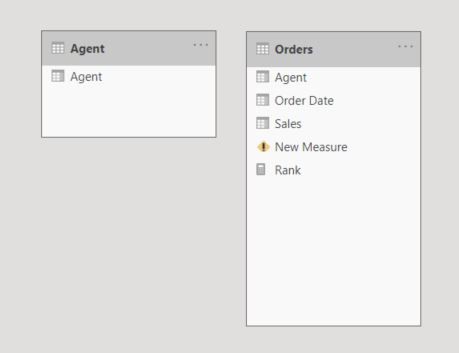
@amitchandak thanks again for your quick response, I can see what it's trying to do but I get an error which I can't resolve image below plus image of the two tables I now have.



- Mark as New
- Bookmark
- Subscribe
- Mute
- Subscribe to RSS Feed
- Permalink
- Report Inappropriate Content
@ChrisPBIUser , In case only need rank based on Agent, then you should not have date in the tbale
Rankx(allselected(Table[Agent]), [Sales]) //Sales is a measure
Rankx(allselected(Table[Agent], Table[Date]), [Sales]) //Sales is a measure, with agent and date
You can now use visual level filter
You can also use TOPN
https://www.youtube.com/watch?v=QIVEFp-QiOk
For Rank Refer these links
https://radacad.com/how-to-use-rankx-in-dax-part-2-of-3-calculated-measures
https://radacad.com/how-to-use-rankx-in-dax-part-1-of-3-calculated-columns
https://radacad.com/how-to-use-rankx-in-dax-part-3-of-3-the-finale
- Mark as New
- Bookmark
- Subscribe
- Mute
- Subscribe to RSS Feed
- Permalink
- Report Inappropriate Content
@amitchandak thanks for the quick response.
The measure I have in place is

- Mark as New
- Bookmark
- Subscribe
- Mute
- Subscribe to RSS Feed
- Permalink
- Report Inappropriate Content
@ChrisPBIUser , for that you need an independent Agent table and then try a measure like
measure =
var _rank= maxx(filter(values(Orders[Agent]),[Agent] in selectedValue(Agent[Agent])),[Rank])
return
calculate([Rank], filter(values(Orders[Agent]), [Rank] >= _rank -2 && [Rank] >= _rank +2))
Refer independent table -https://www.youtube.com/watch?v=lOEW-YUrAbE
- Mark as New
- Bookmark
- Subscribe
- Mute
- Subscribe to RSS Feed
- Permalink
- Report Inappropriate Content
- Mark as New
- Bookmark
- Subscribe
- Mute
- Subscribe to RSS Feed
- Permalink
- Report Inappropriate Content
- Mark as New
- Bookmark
- Subscribe
- Mute
- Subscribe to RSS Feed
- Permalink
- Report Inappropriate Content

Helpful resources

Power BI Monthly Update - May 2026
Check out the May 2026 Power BI update to learn about new features.

Data Days 2026 coming soon!
Sign up to receive a private message when registration opens and key events begin.

New to Fabric Survey
If you have recently started exploring Fabric, we'd love to hear how it's going. Your feedback can help with product improvements.

Power BI DataViz World Championships - June 2026
A new Power BI DataViz World Championship is coming this June! Don't miss out on submitting your entry.

| User | Count |
|---|---|
| 25 | |
| 24 | |
| 22 | |
| 21 | |
| 19 |


| User | Count |
|---|---|
| 51 | |
| 48 | |
| 44 | |
| 21 | |
| 21 |


