cancel
Showing results for 
Search instead for 
Did you mean: 

The Power BI Data Visualization World Championships is back! It's time to submit your entry. Live now!

Reply
shaebert
Helper III
Helper III

Table Slicer Help

Hello, 


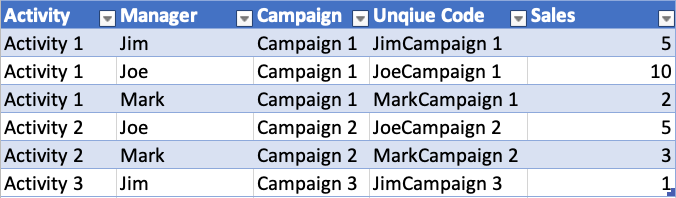
I have a table that I'd like to transform depending on a slicer choice. The table has the following data:


Screen Shot 2019-05-17 at 8.46.53 AM.png

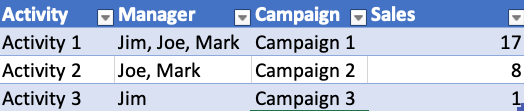
I want to create a visual that displays the data above with a slicer for the Manager. When no specific manager is selected (so ALL) I want the data to appear as this:
 

Screen Shot 2019-05-17 at 8.53.38 AM.png


Then when I select a manager in a slicer (let's say I pick Joe) I want to show the following. 


Screen Shot 2019-05-17 at 8.50.52 AM.png


I am guessing I have to invoke some type of grouping or splitting function when the slicer changes, but I am not sure and don't know how to do that in Power BI. 


Any help would be appreciated! 


1 ACCEPTED SOLUTION
Anonymous
Not applicable

@shaebert - You can create a new Measure:

Managers = CONCATENATEX(VALUES(Table1[Managers]), [Managers],",")

Hope this helps,

Nathan

View solution in original post

2 REPLIES 2
parry2k
Super User
Super User

@shaebert add following measure


Managers = CONCATENATEX( Table4, FIRSTNONBLANK(Table4[Manager],""), "," )

Put table visual and add columns Activity, Managers (new measure), Campaign and Sales in it and you will get the result.


Subscribe to the @PowerBIHowTo YT channel for an upcoming video on List and Record functions in Power Query!!

Learn Power BI and Fabric - subscribe to our YT channel - Click here: @PowerBIHowTo

If my solution proved useful, I'd be delighted to receive Kudos. When you put effort into asking a question, it's equally thoughtful to acknowledge and give Kudos to the individual who helped you solve the problem. It's a small gesture that shows appreciation and encouragement! ❤


Did I answer your question? Mark my post as a solution. Proud to be a Super User! Appreciate your Kudos 🙂
Feel free to email me with any of your BI needs.

Anonymous
Not applicable

@shaebert - You can create a new Measure:

Managers = CONCATENATEX(VALUES(Table1[Managers]), [Managers],",")

Hope this helps,

Nathan

Helpful resources

Announcements
FabCon Atlanta 2026 carousel

FabCon Atlanta 2026

Join us at FabCon Atlanta, March 16-20, for the ultimate Fabric, Power BI, AI and SQL community-led event. Save $200 with code FABCOMM.