Get certified for free when you join Fabric Data Days 2026 and dive into Fabric, Power BI, SQL, AI, and other essential data skills.
Join nowJuly 7 - July 17 | Round 2 of the Power BI Dataviz World Championships. Don't miss your chance! Learn more
Dear all,
I have an Oracle dataset with 6 fields;
Project_1_High
Project_1_Medium
Project_1_Low
Project_2_High
Project_2_Medium
Project_2_Low
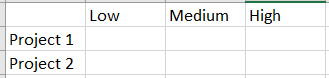
Please how do I create a table where the project types are in rows and the Level in columns. I used Excel to visualize the output needed in Power BI. How do I recreate this in Power BI?
Thanks in advance.
Solved! Go to Solution.
@Adajames123 Attached pbix file for your reference in above reply.
@Adajames123 You can use Power Query to transform your data. Follow below steps to get the expected result:
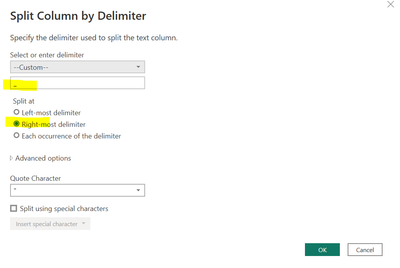
Step 1: Go to Transform Data (Power Query) and right click on the column --> Split Column --> By Delimiter and apply the same setting as per below screen shot:
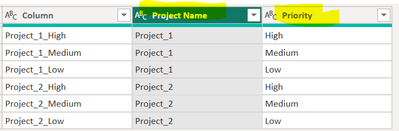
Step 2: Rename them as per your need
Step 3: Apply and close the Power Query Editor
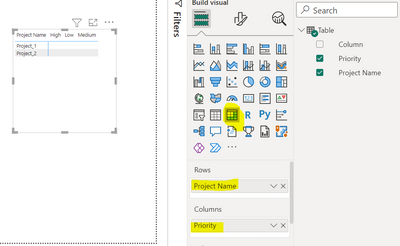
Step 4: On visualization side, take Matrix visual and arrange like below scree shot
I hope it may solve your issue.
@Adajames123 Attached pbix file for your reference in above reply.
Join us in Barcelona for FabCon and SQLCon, the Fabric, Power BI, SQL, and AI community event. Save €200 with code FABCMTY200.
Join Fabric Data Days 2026: 60 days of free live/on-demand sessions, challenges, study groups, and certification opportunities.
| User | Count |
|---|---|
| 22 | |
| 22 | |
| 18 | |
| 16 | |
| 13 |
| User | Count |
|---|---|
| 63 | |
| 42 | |
| 40 | |
| 40 | |
| 38 |