cancel
Showing results for 
Search instead for 
Did you mean: 

The Power BI Data Visualization World Championships is back! Get ahead of the game and start preparing now! Learn more

Reply
Anonymous
Not applicable

Table/Matrix Help

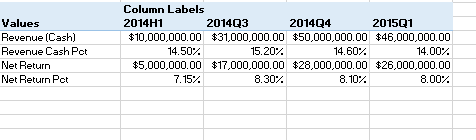
I am bring in four different field values into power bi and would like to put them into a table/matrix similar to how I have them in an excel power pivot table. How would I do this?Capture.PNG

1 ACCEPTED SOLUTION
Phil_Seamark
Microsoft Employee
Microsoft Employee

Hi @Anonymous


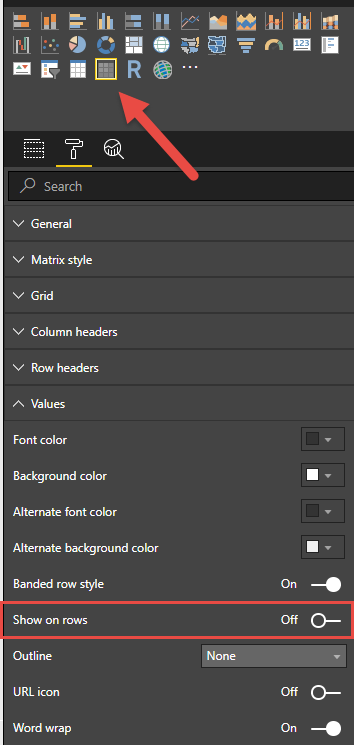
Create four calculated measures and drag them to a matrix visual and turn on the "show on rows" property


image.png


To learn more about DAX visit : aka.ms/practicalDAX

Proud to be a Datanaut!

View solution in original post

1 REPLY 1
Phil_Seamark
Microsoft Employee
Microsoft Employee

Hi @Anonymous


Create four calculated measures and drag them to a matrix visual and turn on the "show on rows" property


image.png


To learn more about DAX visit : aka.ms/practicalDAX

Proud to be a Datanaut!

Helpful resources

Announcements
Power BI DataViz World Championships

Power BI Dataviz World Championships

The Power BI Data Visualization World Championships is back! Get ahead of the game and start preparing now!

December 2025 Power BI Update Carousel

Power BI Monthly Update - December 2025

Check out the December 2025 Power BI Holiday Recap!

FabCon Atlanta 2026 carousel

FabCon Atlanta 2026

Join us at FabCon Atlanta, March 16-20, for the ultimate Fabric, Power BI, AI and SQL community-led event. Save $200 with code FABCOMM.