cancel
Showing results for 
Search instead for 
Did you mean: 

The Power BI Data Visualization World Championships is back! It's time to submit your entry. Live now!

Reply
Anonymous
Not applicable

Table/Matrix Help

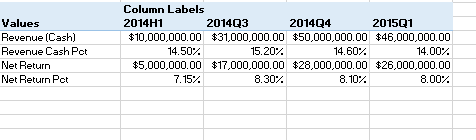
I am bring in four different field values into power bi and would like to put them into a table/matrix similar to how I have them in an excel power pivot table. How would I do this?Capture.PNG

1 ACCEPTED SOLUTION
Phil_Seamark
Microsoft Employee
Microsoft Employee

Hi @Anonymous


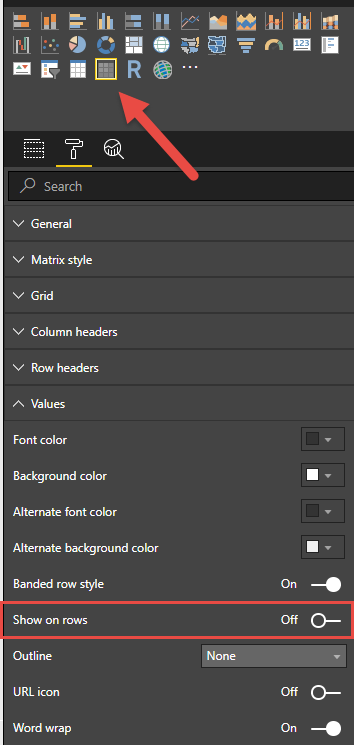
Create four calculated measures and drag them to a matrix visual and turn on the "show on rows" property


image.png


To learn more about DAX visit : aka.ms/practicalDAX

Proud to be a Datanaut!

View solution in original post

1 REPLY 1
Phil_Seamark
Microsoft Employee
Microsoft Employee

Hi @Anonymous


Create four calculated measures and drag them to a matrix visual and turn on the "show on rows" property


image.png


To learn more about DAX visit : aka.ms/practicalDAX

Proud to be a Datanaut!

Helpful resources

Announcements
December 2025 Power BI Update Carousel

Power BI Monthly Update - December 2025

Check out the December 2025 Power BI Holiday Recap!

FabCon Atlanta 2026 carousel

FabCon Atlanta 2026

Join us at FabCon Atlanta, March 16-20, for the ultimate Fabric, Power BI, AI and SQL community-led event. Save $200 with code FABCOMM.