Share feedback directly with Fabric product managers, participate in targeted research studies and influence the Fabric roadmap.
Sign up nowGet Fabric certified for FREE! Don't miss your chance! Learn more
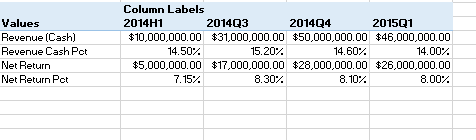
I am bring in four different field values into power bi and would like to put them into a table/matrix similar to how I have them in an excel power pivot table. How would I do this?
Solved! Go to Solution.
Hi @Anonymous
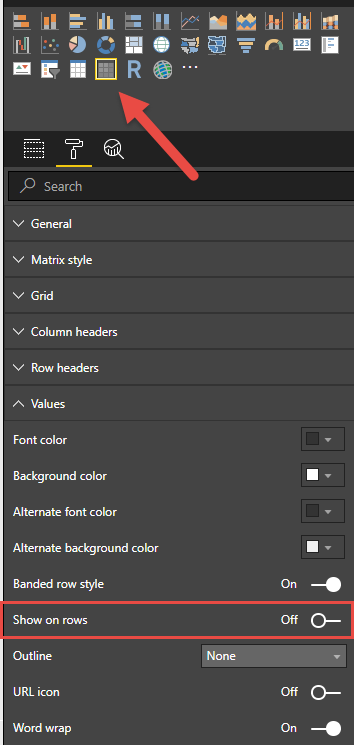
Create four calculated measures and drag them to a matrix visual and turn on the "show on rows" property
Hi @Anonymous
Create four calculated measures and drag them to a matrix visual and turn on the "show on rows" property
If you love stickers, then you will definitely want to check out our Community Sticker Challenge!
Check out the January 2026 Power BI update to learn about new features.
| User | Count |
|---|---|
| 62 | |
| 60 | |
| 45 | |
| 21 | |
| 18 |
| User | Count |
|---|---|
| 122 | |
| 117 | |
| 37 | |
| 34 | |
| 30 |