Share feedback directly with Fabric product managers, participate in targeted research studies and influence the Fabric roadmap.
Sign up nowGet Fabric certified for FREE! Don't miss your chance! Learn more
Hi -
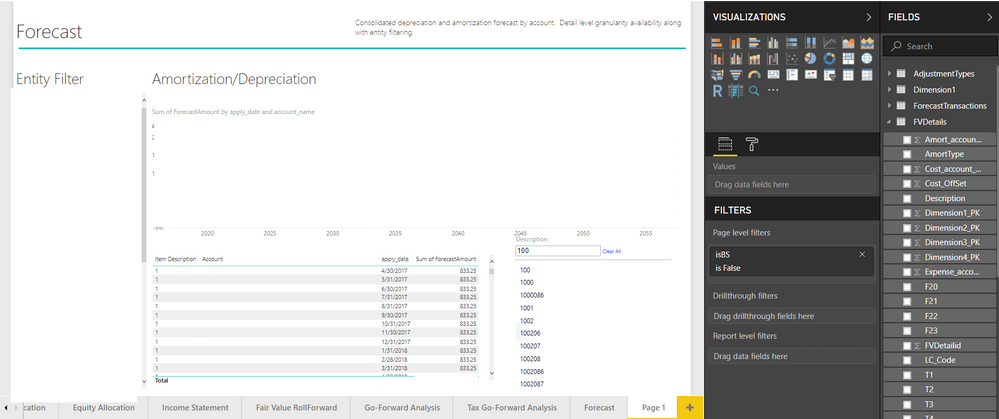
i have a few columns of data in a table. I just want to have a standard excel like filter on one of the fields.
trying to just use a slicer to do this since i'm guessing [table] itself doesn't have the option (PLEASE LET ME KNOW IF IT DOES).
but am having a silly issue that i'm sure is easily resolvable. the slicer only seems to work if i select one item. it doesnt seem to be working like a wildcard. for example if i type 100 in the slicer and hit enter, i would expect that the table would filter to show items with '100' in the description. it doesnt do that (as shown it still shows items with a '1' description). how do i resolve?
Solved! Go to Solution.
Hi @dt_mc,
When you a filter on a slicer (in this case the attribute slicer) you only are selecting what are the values that show on your slicer you then need to select the values that you want from your slicer to filter out the visuals.
You can try the table sorter custom visual that as for each column the functionalities of excel, chek this link, and then you can filter out by the ones that have 100 on it's name.
Regards,
MFelix
Regards
Miguel Félix
Proud to be a Super User!
Check out my blog: Power BI em PortuguêsHi @dt_mc,
When you a filter on a slicer (in this case the attribute slicer) you only are selecting what are the values that show on your slicer you then need to select the values that you want from your slicer to filter out the visuals.
You can try the table sorter custom visual that as for each column the functionalities of excel, chek this link, and then you can filter out by the ones that have 100 on it's name.
Regards,
MFelix
Regards
Miguel Félix
Proud to be a Super User!
Check out my blog: Power BI em PortuguêsIf you love stickers, then you will definitely want to check out our Community Sticker Challenge!
Check out the January 2026 Power BI update to learn about new features.
| User | Count |
|---|---|
| 63 | |
| 58 | |
| 46 | |
| 21 | |
| 18 |
| User | Count |
|---|---|
| 119 | |
| 116 | |
| 37 | |
| 34 | |
| 30 |