cancel
Showing results for 
Search instead for 
Did you mean: 

Try your skills in the Power BI Dataviz World Championship! Round one ends June 26. Join now

Reply
RAHULBANDI
Helper II
Helper II

Table Calculations

Hi Team,


NameAmount
Raj100
Raj100
Sri200
Sri200
Anu300


Expected Output:


NameAmountName1Amount1Name2Amount2
Raj100Raj100BlankBlank
Sri200BlankBlankSri200
Anu300BlankBlankBlankBlank


I'm looking for following Output with help of DAX

1 ACCEPTED SOLUTION
Anonymous
Not applicable

Hi @RAHULBANDI ,

Please try below steps:

1. add a index column with power query pane, because
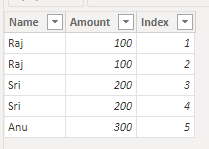
vbinbinyumsft_0-1669614395848.png

2. add measure with below dax formula


Name1 =
VAR cur_id =
    SELECTEDVALUE ( 'Table'[Index] )
VAR cur_name =
    SELECTEDVALUE ( 'Table'[Name] )
VAR cur_at =
    CALCULATE ( MAX ( 'Table'[Amount] ), 'Table'[Index] = cur_id )
RETURN
    SWITCH ( TRUE (), cur_id = 1, cur_name, cur_id = 2, cur_name, "Blank" )
Amount1 =
VAR cur_id =
    SELECTEDVALUE ( 'Table'[Index] )
VAR cur_name =
    SELECTEDVALUE ( 'Table'[Name] )
VAR cur_at =
    CALCULATE ( MAX ( 'Table'[Amount] ), 'Table'[Index] = cur_id )
RETURN
    SWITCH ( TRUE (), cur_id = 1, cur_at, cur_id = 2, cur_at, "Blank" )
Name2 =
VAR cur_id =
    SELECTEDVALUE ( 'Table'[Index] )
VAR cur_name =
    SELECTEDVALUE ( 'Table'[Name] )
VAR cur_at =
    CALCULATE ( MAX ( 'Table'[Amount] ), 'Table'[Index] = cur_id )
RETURN
    SWITCH ( TRUE (), cur_id = 3, cur_name, cur_id = 4, cur_name, "Blank" )
Amount2 =
VAR cur_id =
    SELECTEDVALUE ( 'Table'[Index] )
VAR cur_name =
    SELECTEDVALUE ( 'Table'[Name] )
VAR cur_at =
    CALCULATE ( MAX ( 'Table'[Amount] ), 'Table'[Index] = cur_id )
RETURN
    SWITCH ( TRUE (), cur_id = 3, cur_at, cur_id = 4, cur_at, "Blank" )


3. add a table visual with table fields and measure
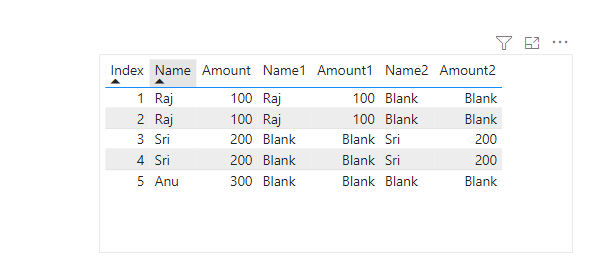
vbinbinyumsft_1-1669615063907.png

Please refer the attached .pbix file.


Best regards,
Community Support Team_ Binbin Yu
If this post helps, then please consider Accept it as the solution to help the other members find it more quickly.

View solution in original post

2 REPLIES 2
Anonymous
Not applicable

Hi @RAHULBANDI ,

Please try below steps:

1. add a index column with power query pane, because

vbinbinyumsft_0-1669614395848.png

2. add measure with below dax formula


Name1 =
VAR cur_id =
    SELECTEDVALUE ( 'Table'[Index] )
VAR cur_name =
    SELECTEDVALUE ( 'Table'[Name] )
VAR cur_at =
    CALCULATE ( MAX ( 'Table'[Amount] ), 'Table'[Index] = cur_id )
RETURN
    SWITCH ( TRUE (), cur_id = 1, cur_name, cur_id = 2, cur_name, "Blank" )
Amount1 =
VAR cur_id =
    SELECTEDVALUE ( 'Table'[Index] )
VAR cur_name =
    SELECTEDVALUE ( 'Table'[Name] )
VAR cur_at =
    CALCULATE ( MAX ( 'Table'[Amount] ), 'Table'[Index] = cur_id )
RETURN
    SWITCH ( TRUE (), cur_id = 1, cur_at, cur_id = 2, cur_at, "Blank" )
Name2 =
VAR cur_id =
    SELECTEDVALUE ( 'Table'[Index] )
VAR cur_name =
    SELECTEDVALUE ( 'Table'[Name] )
VAR cur_at =
    CALCULATE ( MAX ( 'Table'[Amount] ), 'Table'[Index] = cur_id )
RETURN
    SWITCH ( TRUE (), cur_id = 3, cur_name, cur_id = 4, cur_name, "Blank" )
Amount2 =
VAR cur_id =
    SELECTEDVALUE ( 'Table'[Index] )
VAR cur_name =
    SELECTEDVALUE ( 'Table'[Name] )
VAR cur_at =
    CALCULATE ( MAX ( 'Table'[Amount] ), 'Table'[Index] = cur_id )
RETURN
    SWITCH ( TRUE (), cur_id = 3, cur_at, cur_id = 4, cur_at, "Blank" )


3. add a table visual with table fields and measure

vbinbinyumsft_1-1669615063907.png

Please refer the attached .pbix file.


Best regards,
Community Support Team_ Binbin Yu
If this post helps, then please consider Accept it as the solution to help the other members find it more quickly.

daXtreme
Solution Sage
Solution Sage

Mate, maybe you'd like to say anything about how you arrive at the output? For someone to be able to help you, this someone must have a clear understanding of the rules that lead to the end result. From your post it's about as clear as mud how to arrive at the table. Thanks.


Please read this first: How to Get Your Question Answered Quickly - Microsoft Power BI Community

Helpful resources

Announcements
Fabric Data Days is here Carousel

Data Days 2026

Don't miss out on Data Days, June 15 through August 7. Learn Fabric, Power BI, SQL, AI and more.

Power BI DataViz World Championships carousel

Power BI DataViz World Championships - June 2026

A new Power BI DataViz World Championship is coming this June! Don't miss out on submitting your entry.