Join us at FabCon Atlanta from March 16 - 20, 2026, for the ultimate Fabric, Power BI, AI and SQL community-led event. Save $200 with code FABCOMM.
Register now!The Power BI Data Visualization World Championships is back! Get ahead of the game and start preparing now! Learn more
Good morning! As my PowerBI reporting grows - so does the complexity of managing all the visuals and tabs (sheets).
1) Is there a way to manage or group tabs. We have ways of grouping bookmarks, would there be something similar for tabs? I am finding it very difficult to find certain tabs - as a scroll thru tabs at the bottom. Are there options I am not aware of?
2) Same thing holds true for visuals - some way of labeling a visual, and then searching for that visual across all tabs?
Always appreciate the wisdom of the forum!
daryl
Solved! Go to Solution.
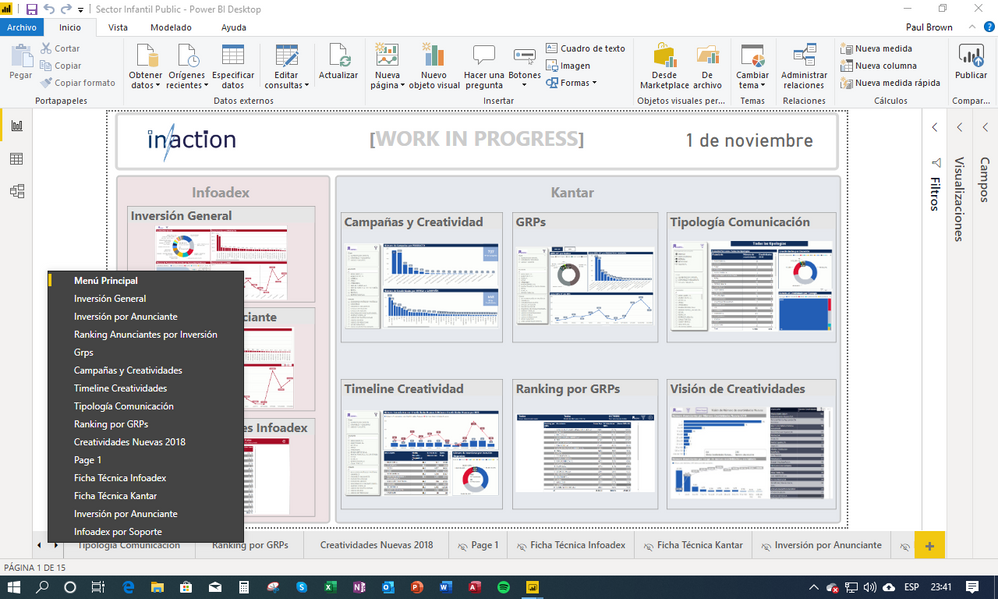
As regards finding tabs, PBI has a little hidden secret… In Desktop, If you right click on the Tab/Sheet navigation arrows in the bottom left corner of the screen, you get list display of all your sheets. making it easy to reach the one you are looking for:
I also create a Menu page as my first page in my projects, with thumbnails to each sheet in the report (using bookmarks) and a "Home" button in every sheet to return to the main menu. (see example above)
Haven't yet come across a suitable solution for you request on visuals though.
Hope it helps.
Proud to be a Super User!
Paul on Linkedin.
As regards finding tabs, PBI has a little hidden secret… In Desktop, If you right click on the Tab/Sheet navigation arrows in the bottom left corner of the screen, you get list display of all your sheets. making it easy to reach the one you are looking for:
I also create a Menu page as my first page in my projects, with thumbnails to each sheet in the report (using bookmarks) and a "Home" button in every sheet to return to the main menu. (see example above)
Haven't yet come across a suitable solution for you request on visuals though.
Hope it helps.
Proud to be a Super User!
Paul on Linkedin.
The right click on the tab scroll arrows is an awesome little short cut. Thanks 🙂
Proud to be a Super User!
Yes, thank you, right clicking on the lower right sheet arrows helps. I did not know that. I do have a front tab used as a navigation for all the primary pages, but am thinking of creating a second "content" page for all the drill thru and tooltip pages.
Thank you both!
Hey, I'm not aware of a method of grouping tabs I'm afraid.
As far as visuals, I always give my visuals individual titles, even if i don't display the title, it makes it much easier to when dealing with multiple bookmarks etc. You can easily find it then/
Proud to be a Super User!
The Power BI Data Visualization World Championships is back! Get ahead of the game and start preparing now!
Check out the November 2025 Power BI update to learn about new features.
| User | Count |
|---|---|
| 59 | |
| 43 | |
| 42 | |
| 23 | |
| 17 |
| User | Count |
|---|---|
| 190 | |
| 122 | |
| 96 | |
| 66 | |
| 47 |