Join us at FabCon Atlanta from March 16 - 20, 2026, for the ultimate Fabric, Power BI, AI and SQL community-led event. Save $200 with code FABCOMM.
Register now!The Power BI Data Visualization World Championships is back! Get ahead of the game and start preparing now! Learn more
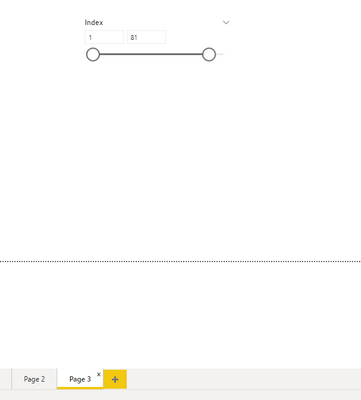
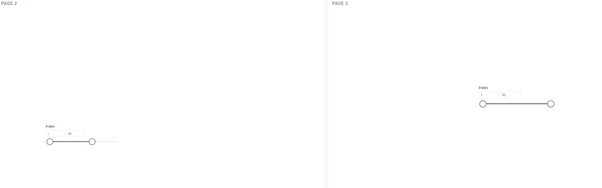
Syncing slicers are working correctly on Desktop but i have issues on slicer synchronization on Cloud. Am i missing something?
Desktop:
Cloud:
Solved! Go to Solution.
Hi, @kala2
I noticed that you tried to make the sync slicer work on two tiles on the dashboard.
Yes, after my testing, the Sync slicers feature doesn't work accross tiles in a dashboard
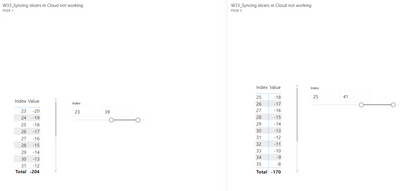
Please note that the sync slicer can work in desktop and service reports, but it cannot work between different tiles on the dashboard.
The different tiles work independently of each other, and it is not possible to interact with the Synchronized Slicer as it is in reports.
The slicer can only interact with other visuals of the same tile, not with visuals of different tiles, which is a design behavior.
Refer:
Dashboard and Sync slicers across multiple pages of your report - not working on the Dashboard
How to filter tiles on a dashboard in power BI service
Best Regards,
Community Support Team _ Zeon Zheng
If this post helps, then please consider Accept it as the solution to help the other members find it more quickly.
Hi, @kala2
I noticed that you tried to make the sync slicer work on two tiles on the dashboard.
Yes, after my testing, the Sync slicers feature doesn't work accross tiles in a dashboard
Please note that the sync slicer can work in desktop and service reports, but it cannot work between different tiles on the dashboard.
The different tiles work independently of each other, and it is not possible to interact with the Synchronized Slicer as it is in reports.
The slicer can only interact with other visuals of the same tile, not with visuals of different tiles, which is a design behavior.
Refer:
Dashboard and Sync slicers across multiple pages of your report - not working on the Dashboard
How to filter tiles on a dashboard in power BI service
Best Regards,
Community Support Team _ Zeon Zheng
If this post helps, then please consider Accept it as the solution to help the other members find it more quickly.
@amitchandak Tried Clear Cache (Browser), Clear Cache (Power BI Desktop), Republish. Sync slicers not working
Is there a way to make a sync across multiple pages on a dashboard?
Desktop:
Cloud:
Hi @kala2
You can sync slicers on a Report across multiple Pages, which I think is what you want.
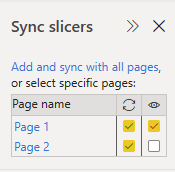
On Power BI Desktop go to the View Ribbon, and select Sync Slicers, or in Edit mode on a Report in Service go to "View" and select "Sync Slicers Pane on".
That gives a "Sync Slicers" pane that shows the Pages on the Report and whether Slicers affect them, or are visible on them, remember to select a Slicer first to see the sync status.
See Slicers in Power BI - Power BI | Microsoft Docs | Sync Slicers
Hope this helps
Stuart
Check out the November 2025 Power BI update to learn about new features.
Advance your Data & AI career with 50 days of live learning, contests, hands-on challenges, study groups & certifications and more!
| User | Count |
|---|---|
| 58 | |
| 45 | |
| 42 | |
| 20 | |
| 18 |