cancel
Showing results for 
Search instead for 
Did you mean: 

July 7 - July 17 | Round 2 of the Power BI Dataviz World Championships. Don't miss your chance! Learn more

Reply
Anonymous
Not applicable

Sybase connectivity issue

Hi all

We are trying to connect power BI to Sybase and its not working.


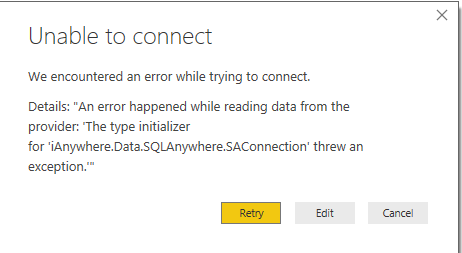
Approach 1: Tried to use Sybase connector, but getting the below error . An Error happened while reading data from the provider.The type initializer for 'iAnywhere.Data.SQLAnywhere.SAConnection' threw an exception. Its straight forward. Provided the server, database name, user name/ pwd. Is there any specific syntax to enter the server name ( lik including port number..something like that? )


Sybase.PNG


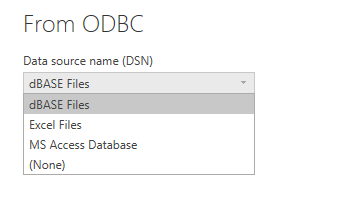
Approach 2: Trying to use ODBC connector to connect to Sybase, But in that, there is no option to select the DSN. It provides only dBase files, Excel files,MS Access Database options.


ODBC.PNG


Any help is highly appreciated.


Thanks

Raj


3 REPLIES 3
Goku7
Frequent Visitor

Hi,


Is your problem solved?

I could not connect through Sybase Anywhere and got a different error.


But if your database is running on another computer you must download Sybase IQ or ASE to your computer.

After that you should define the ODBC connection and test the connection.


Have a good day

Eric_Zhang
Microsoft Employee
Microsoft Employee

@Anonymous

The approach 2 indicates the incompatibility between 64 bit Pbi desktop VS 32 bit Sysbase driver or on the contrary. In any case, please install 64 bit driver, otherwise the gateway won't work for "schedule refresh".

Anonymous
Not applicable


Hi all


We are trying to connect power BI to Sybase and its not working.


Approach 1: Tried to use Sybase connector, but getting the below error . An Error happened while reading data from the provider.The type initializer for 'iAnywhere.Data.SQLAnywhere.SAConnection' threw an exception. Its straight forward. Provided the server, database name, user name/ pwd. Is there any specific syntax to enter the server name ( lik including port number..something like that? )


Sybase.PNG


Approach 2: Trying to use ODBC connector to connect to Sybase, But in that, there is no option to select the DSN. It provides only dBase files, Excel files,MS Access Database options.


ODBC.PNG


Any help is highly appreciated.


Thanks

Raj

Helpful resources

Announcements
FabCon and SQLCon Barcelona 2026

FabCon & SQLCon – Barcelona 2026

Join us in Barcelona for FabCon and SQLCon, the Fabric, Power BI, SQL, and AI community event. Save €200 with code FABCMTY200.

60 days of Data Days Carousel

Data Days 2026

Join Data Days 2026: 60 days of free live/on-demand sessions, challenges, study groups, and certification opportunities.

Power BI DataViz World Championships carousel

Power BI DataViz World Championships - June 2026

A new Power BI DataViz World Championship is coming this June! Don't miss out on submitting your entry.

Top Solution Authors