Don't miss your chance to take the Fabric Data Engineer (DP-600) exam for FREE! Find out how by watching the DP-600 session on-demand now through April 28th.
Learn moreJoin the FabCon + SQLCon recap series. Up next: Power BI, Real-Time Intelligence, IQ and AI, and Data Factory take center stage. All sessions are available on-demand after the live show. Register now
Hi all
We are trying to connect power BI to Sybase and its not working.
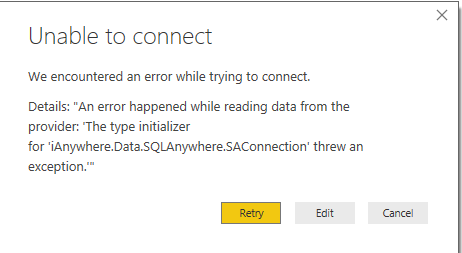
Approach 1: Tried to use Sybase connector, but getting the below error . An Error happened while reading data from the provider.The type initializer for 'iAnywhere.Data.SQLAnywhere.SAConnection' threw an exception. Its straight forward. Provided the server, database name, user name/ pwd. Is there any specific syntax to enter the server name ( lik including port number..something like that? )
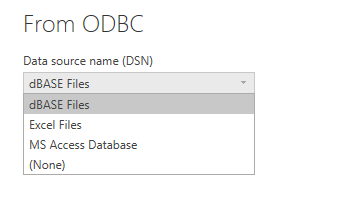
Approach 2: Trying to use ODBC connector to connect to Sybase, But in that, there is no option to select the DSN. It provides only dBase files, Excel files,MS Access Database options.
Any help is highly appreciated.
Thanks
Raj
Hi,
Is your problem solved?
I could not connect through Sybase Anywhere and got a different error.
But if your database is running on another computer you must download Sybase IQ or ASE to your computer.
After that you should define the ODBC connection and test the connection.
Have a good day
@Anonymous
The approach 2 indicates the incompatibility between 64 bit Pbi desktop VS 32 bit Sysbase driver or on the contrary. In any case, please install 64 bit driver, otherwise the gateway won't work for "schedule refresh".
Hi all
We are trying to connect power BI to Sybase and its not working.
Approach 1: Tried to use Sybase connector, but getting the below error . An Error happened while reading data from the provider.The type initializer for 'iAnywhere.Data.SQLAnywhere.SAConnection' threw an exception. Its straight forward. Provided the server, database name, user name/ pwd. Is there any specific syntax to enter the server name ( lik including port number..something like that? )
Approach 2: Trying to use ODBC connector to connect to Sybase, But in that, there is no option to select the DSN. It provides only dBase files, Excel files,MS Access Database options.
Any help is highly appreciated.
Thanks
Raj
Check out the April 2026 Power BI update to learn about new features.
If you have recently started exploring Fabric, we'd love to hear how it's going. Your feedback can help with product improvements.
A new Power BI DataViz World Championship is coming this June! Don't miss out on submitting your entry.
| User | Count |
|---|---|
| 45 | |
| 38 | |
| 34 | |
| 21 | |
| 17 |
| User | Count |
|---|---|
| 68 | |
| 64 | |
| 31 | |
| 26 | |
| 26 |