cancel
Showing results for 
Search instead for 
Did you mean: 

A new Data Days event is coming soon! This time we’re going bigger than ever. Fabric, Power BI, SQL, AI and more. Don't miss out.

Reply
Anonymous
Not applicable

Sybase connectivity issue

Hi all

We are trying to connect power BI to Sybase and its not working.


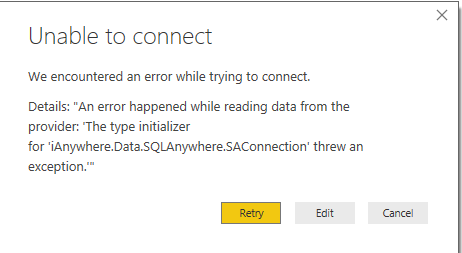
Approach 1: Tried to use Sybase connector, but getting the below error . An Error happened while reading data from the provider.The type initializer for 'iAnywhere.Data.SQLAnywhere.SAConnection' threw an exception. Its straight forward. Provided the server, database name, user name/ pwd. Is there any specific syntax to enter the server name ( lik including port number..something like that? )


Sybase.PNG


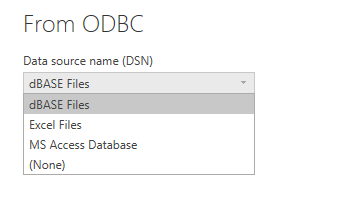
Approach 2: Trying to use ODBC connector to connect to Sybase, But in that, there is no option to select the DSN. It provides only dBase files, Excel files,MS Access Database options.


ODBC.PNG


Any help is highly appreciated.


Thanks

Raj


3 REPLIES 3
Goku7
Frequent Visitor

Hi,


Is your problem solved?

I could not connect through Sybase Anywhere and got a different error.


But if your database is running on another computer you must download Sybase IQ or ASE to your computer.

After that you should define the ODBC connection and test the connection.


Have a good day

Eric_Zhang
Microsoft Employee
Microsoft Employee

@Anonymous

The approach 2 indicates the incompatibility between 64 bit Pbi desktop VS 32 bit Sysbase driver or on the contrary. In any case, please install 64 bit driver, otherwise the gateway won't work for "schedule refresh".

Anonymous
Not applicable


Hi all


We are trying to connect power BI to Sybase and its not working.


Approach 1: Tried to use Sybase connector, but getting the below error . An Error happened while reading data from the provider.The type initializer for 'iAnywhere.Data.SQLAnywhere.SAConnection' threw an exception. Its straight forward. Provided the server, database name, user name/ pwd. Is there any specific syntax to enter the server name ( lik including port number..something like that? )


Sybase.PNG


Approach 2: Trying to use ODBC connector to connect to Sybase, But in that, there is no option to select the DSN. It provides only dBase files, Excel files,MS Access Database options.


ODBC.PNG


Any help is highly appreciated.


Thanks

Raj

Helpful resources

Announcements
Fabric SQL PBI Data Days

Data Days 2026 coming soon!

Sign up to receive a private message when registration opens and key events begin.

New to Fabric survey Carousel

New to Fabric Survey

If you have recently started exploring Fabric, we'd love to hear how it's going. Your feedback can help with product improvements.

Power BI DataViz World Championships carousel

Power BI DataViz World Championships - June 2026

A new Power BI DataViz World Championship is coming this June! Don't miss out on submitting your entry.