Join us at FabCon Atlanta from March 16 - 20, 2026, for the ultimate Fabric, Power BI, AI and SQL community-led event. Save $200 with code FABCOMM.
Register now!Learn from the best! Meet the four finalists headed to the FINALS of the Power BI Dataviz World Championships! Register now
I am having an issue while switching a report with Direct Query to Import
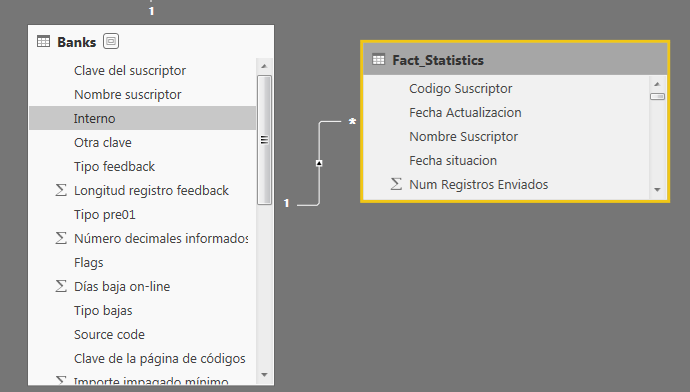
Column 'Import' in Table 'Fact_Statistics' contains blank values and this is not allowed for columns on the one side of a many-to-one relationship or for columns that are used as the primary key of a table.
Import column is not the Primary Key, can the issue be caused by some key field not existing on One side?
Solved! Go to Solution.
Hi @dpombal,
I could reproduce your problem, if you want to create relationship between the two tables, you could delete the orginal relationship firstly, then try to import your data table and create the relationship, now you could get the result.
Hope it could help you.
Regards,
Daniel He
Hi @dpombal,
I could reproduce your problem, if you want to create relationship between the two tables, you could delete the orginal relationship firstly, then try to import your data table and create the relationship, now you could get the result.
Hope it could help you.
Regards,
Daniel He
So Starting with Direct Query, which is my usecase.
1. Direct Query Report with relationship between A and B
2. Delete relationship between A and B
3. Switch to Import
ok?
Hi @dpombal,
Yes, you could try this and if have any problems, please let me know.
Regards,
Daniel He
Hi , after Removing relationships,
problem still persists....
Column 'import' in table FACT contains blank values and this is not allowed for columns on the one side of many-to-one relationship or for columns that are used as the primary key of a table
Share feedback directly with Fabric product managers, participate in targeted research studies and influence the Fabric roadmap.
Check out the February 2026 Power BI update to learn about new features.
| User | Count |
|---|---|
| 61 | |
| 59 | |
| 42 | |
| 18 | |
| 15 |
| User | Count |
|---|---|
| 109 | |
| 101 | |
| 39 | |
| 29 | |
| 29 |