cancel
Showing results for 
Search instead for 
Did you mean: 

Get Fabric Certified for FREE during Fabric Data Days. Don't miss your chance! Request now

Reply
Anonymous
Not applicable

Switching Function


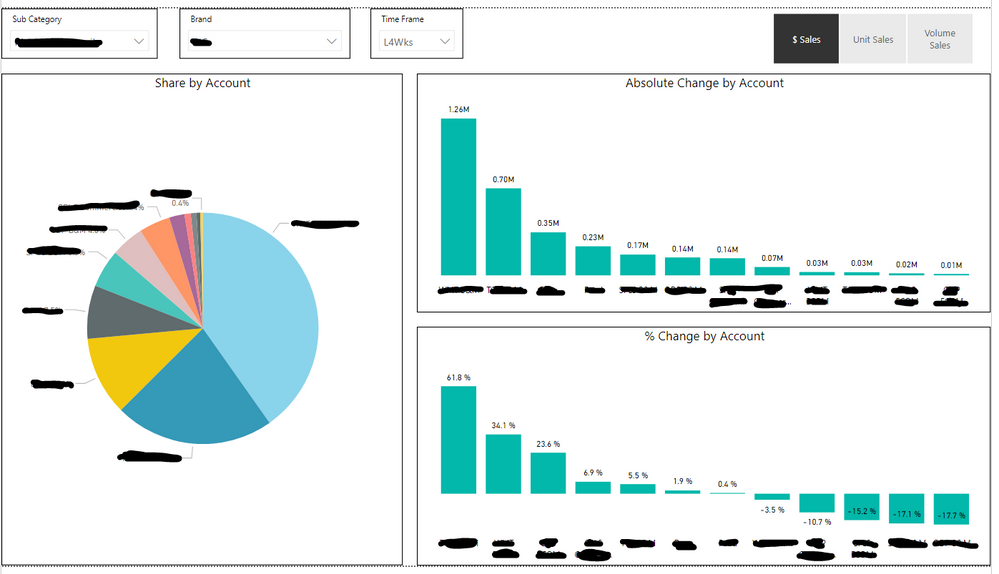
I have three graphs (shown below) that I want to be dynamic with the slicer in the top right. The slicer that I want all the graphs tied to is based on a SWITCH function for Dollars, Units, and Volume sales.  

The slicer now only shows the current dollars, units, or volume, but I need it to connect to the Absolute change and % change graphs as well. 

Is there a way to connect absolute change and % change to the same slicer so that the user only has to select $/Units/Volume once instead of for each chart. Desktop Picture.PNG

1 ACCEPTED SOLUTION
v-lili6-msft
Community Support
Community Support

hi  @Anonymous 

There are two way to achieve your requirement:

1. Use Switching Function in dax, please see more details as below:

Dynamically change the information within a visual via a slicer

2. use bookmark to create three states of current page as amitchandak provided.


Regards,

Lin

Community Support Team _ Lin
If this post helps, then please consider Accept it as the solution to help the other members find it more quickly.

View solution in original post

4 REPLIES 4
v-lili6-msft
Community Support
Community Support

hi  @Anonymous 

There are two way to achieve your requirement:

1. Use Switching Function in dax, please see more details as below:

Dynamically change the information within a visual via a slicer

2. use bookmark to create three states of current page as amitchandak provided.


Regards,

Lin

Community Support Team _ Lin
If this post helps, then please consider Accept it as the solution to help the other members find it more quickly.
amitchandak
Super User
Super User

As referred above to use measure selection function. you can try that. Similar post

https://community.powerbi.com/t5/Desktop/Slicer-MTD-QTD-YTD-to-filter-dates-using-the-slicer/td-p/50...


But I think you might need bookmark feature to change the graph type

Refer : https://radacad.com/bookmarks-and-buttons-making-power-bi-charts-even-more-interactive


Share with Power BI Enthusiasts: Full Power BI Video (20 Hours) YouTube
Microsoft Fabric Series 60+ Videos YouTube
Microsoft Fabric Hindi End to End YouTube
Anonymous
Not applicable

Hi @Anonymous ,


Yes, I would recommend you calculate the absolute % and % change for each slicer option ($/Units/Volume) then create a new switch function that switches between the % change depending on which slicer is selected. You could also have a second slicer that the user could toggle between absolute % and % chg.


% Change by Account =
Var SV = SELECTEDVALUE('$/U/Volume'[Selection])
RETURN
SWITCH(SV,"$ Sales",[$ % Chg],"Unit Sales",[Unit % Chg],"Volume Sales",[Volume % Chg])
 
 
$ % Chg = divide([New Value]-[Old Value],[Old Value])
 
% Change or Abs % =
Var SV = SELECTEDVALUE('% Chg or Abs % Slicer'[Selection])
RETURN
SWITCH(SV, "% Chg",[% Change by Account],"Abs $",[Abs % Change by Account])
 
Let me know if that's unclear at all.
- Paul
Greg_Deckler
Community Champion
Community Champion

Yes, you would create a measure for each graph that grabs SELECTEDVALUE from your slicer and then uses that as the basis for a SWITCH or SWITCH(TRUE()...) statement that would perform the correct calculation. Would need to know more about your formulas and source data and model to be more specific. Please see this post regarding How to Get Your Question Answered Quickly: https://community.powerbi.com/t5/Community-Blog/How-to-Get-Your-Question-Answered-Quickly/ba-p/38490


Follow on LinkedIn
@ me in replies or I'll lose your thread!!!
Instead of a Kudo, please vote for this idea
Become an expert!: Enterprise DNA
External Tools: MSHGQM
YouTube Channel!: Microsoft Hates Greg
Latest book!:
DAX For Humans

DAX is easy, CALCULATE makes DAX hard...

Helpful resources

Announcements
Fabric Data Days Carousel

Fabric Data Days

Advance your Data & AI career with 50 days of live learning, contests, hands-on challenges, study groups & certifications and more!

October Power BI Update Carousel

Power BI Monthly Update - October 2025

Check out the October 2025 Power BI update to learn about new features.

FabCon Atlanta 2026 carousel

FabCon Atlanta 2026

Join us at FabCon Atlanta, March 16-20, for the ultimate Fabric, Power BI, AI and SQL community-led event. Save $200 with code FABCOMM.

Top Solution Authors