Join us at FabCon Atlanta from March 16 - 20, 2026, for the ultimate Fabric, Power BI, AI and SQL community-led event. Save $200 with code FABCOMM.
Register now!Learn from the best! Meet the four finalists headed to the FINALS of the Power BI Dataviz World Championships! Register now
Good morning,
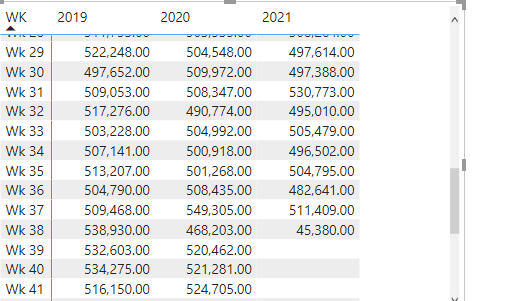
I'm wondering if it's possible to have % difference columns in a switch function.
I have this switch function which is returning yearly sales? I would like to add 2 columns showing the % diff from 2020 & 2019.
Thanks in advance.
@brinky , if you have date table and year week coming from there. Last year same day week is 1 year behind , which can be used
example
Year behind Sales = CALCULATE(SUM(Sales[Sales Amount]),dateadd('Date'[Date],-364,Day))
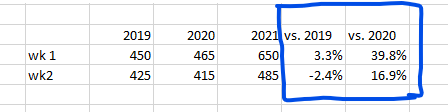
Thanks Amit for your prompt reply, maybe I didn't explain myself well.
This is what I'm trying to add to my yearly sales.
@brinky , If year is column(used in matrix column, you need a hybrid table). Not a direct option, you need alternatives
Otherwise, use [Measure] and [Change %] measure as values
if you are looking for a Hybrid display with Matrix Column and measure
https://community.powerbi.com/t5/Community-Blog/Creating-a-custom-or-hybrid-matrix-in-PowerBI/ba-p/1...
https://community.powerbi.com/t5/Quick-Measures-Gallery/The-New-Hotness-Custom-Matrix-Hierarchy/m-p/...
vote for Hybrid Table
https://ideas.powerbi.com/ideas/idea/?ideaid=9bc32b23-1eb1-4e74-8b34-349887b37ebc
Thanks Amit, this looks interesting.
As a superuser 😉 just for curiosity are there any altermatives?
Share feedback directly with Fabric product managers, participate in targeted research studies and influence the Fabric roadmap.
Check out the February 2026 Power BI update to learn about new features.
| User | Count |
|---|---|
| 62 | |
| 55 | |
| 39 | |
| 16 | |
| 15 |
| User | Count |
|---|---|
| 93 | |
| 85 | |
| 33 | |
| 31 | |
| 25 |