Join us at FabCon Atlanta from March 16 - 20, 2026, for the ultimate Fabric, Power BI, AI and SQL community-led event. Save $200 with code FABCOMM.
Register now!View all the Fabric Data Days sessions on demand. View schedule
Hi,
Suppose I have a table named MasterData in my dataset with the following columns:
| Name | UnMaskedEmailID | MaskedEmailID |
| John Doe | john.doe@abc.com | *****@***.com |
| Mary Jane | mary.jane@abc.com | *****@***.com |
| Bruce Wayne | bruce.wayne@abc.com | *****@***.com |
Also I have a table which would store the access level of users ie
| Role | |
| admin@abc.com | Admin |
| user1@abc.com | Viewer |
| dev1@abc.com | Member |
Now what I want to achieve is that if the user admin@abc.com logs in into powerbi service, then he should see
| Name | UnMaskedEmailID |
| John Doe | john.doe@abc.com |
| Mary Jane | mary.jane@abc.com |
| Bruce Wayne | bruce.wayne@abc.com |
Whereas if user1@abc.com or dev1@abc.com logs in into powerbi service, then they should see
| Name | MaskedEmailID |
| John Doe | *****@***.com |
| Mary Jane | *****@***.com |
| Bruce Wayne | *****@***.com |
Any help would be greatly appreciated.
Thanks!
Solved! Go to Solution.
Hi @saif ,
You need to create a dimension table as below:
Table 2 = CROSSJOIN(GENERATESERIES(1,3,1),VALUES('Table'[UnMaskedEmailID ]))
Then create a measure as below:
Measure = SWITCH(
SELECTEDVALUE('Table 2'[Value]),1,CALCULATE(MAX('Table'[UnMaskedEmailID ]),FILTER(ALL('Table'),'Table'[Name]=MAX('Table'[Name]))),2,"xxx@xxx.com",3,BLANK())
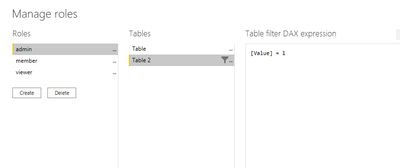
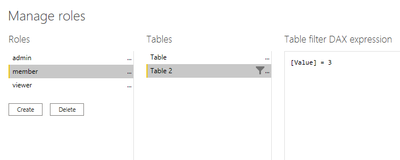
Then using RLS,set the roles as below:
And you will see:
For the related .pbix file,pls see attached.
Best Regards,
Kelly
Did I answer your question? Mark my post as a solution!
Hi @saif ,
You need to create a dimension table as below:
Table 2 = CROSSJOIN(GENERATESERIES(1,3,1),VALUES('Table'[UnMaskedEmailID ]))
Then create a measure as below:
Measure = SWITCH(
SELECTEDVALUE('Table 2'[Value]),1,CALCULATE(MAX('Table'[UnMaskedEmailID ]),FILTER(ALL('Table'),'Table'[Name]=MAX('Table'[Name]))),2,"xxx@xxx.com",3,BLANK())
Then using RLS,set the roles as below:
And you will see:
For the related .pbix file,pls see attached.
Best Regards,
Kelly
Did I answer your question? Mark my post as a solution!
Thank you for your detailed explaination. This really helps!🤝
@saif , I think perspectives can help
https://data-marc.com/2020/08/18/power-bi-visual-customization-using-perspectives/
Check out the November 2025 Power BI update to learn about new features.
Advance your Data & AI career with 50 days of live learning, contests, hands-on challenges, study groups & certifications and more!