cancel
Showing results for 
Search instead for 
Did you mean: 

We've captured the moments from FabCon & SQLCon that everyone is talking about, and we are bringing them to the community, live and on-demand. Starts on April 14th. Register now

Reply
Anonymous
Not applicable

Switch Statement?

I have two formulas built:

1.PNG


1.PNG


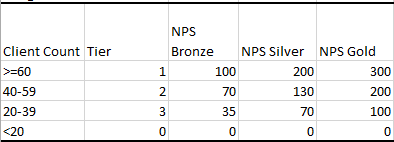
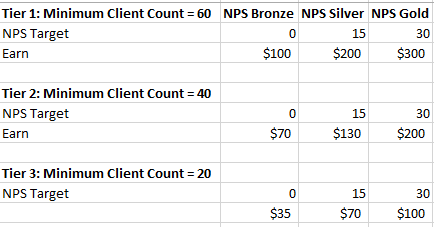
A person is placed into different tiers depending upon the amount of active clients they manage. Their NPS level is decided based off of their NPS score. I also have this model:

1.PNG


Based off of this model, how can I set up a calculated formula that will be something along the lines of:

If [Tier] = "2" && [NPS Level] = "NPS Silver", Employee X is awarded $130

If [Tier] = "1" && [NPS Level] = "NPS Bronze", Employee X is awarded $100

etc.

etc.


So depending on whatever tier and nps level an employee has, the formula returns whatever dollar amount it amounts to in the model? I've built something once that did work the way I wanted it to, my issue was afterwards I could not use the measure mathematically. It was just a number that I couldn't add or sum. Thanks!


2 REPLIES 2
Greg_Deckler
Community Champion
Community Champion

Sample data would assist greatly. Please see this post regarding How to Get Your Question Answered Quickly: https://community.powerbi.com/t5/Community-Blog/How-to-Get-Your-Question-Answered-Quickly/ba-p/38490


Follow on LinkedIn
@ me in replies or I'll lose your thread!!!
Instead of a Kudo, please vote for this idea
Become an expert!: Enterprise DNA
External Tools: MSHGQM
YouTube Channel!: Microsoft Hates Greg
Latest book!:
DAX For Humans

DAX is easy, CALCULATE makes DAX hard...
Anonymous
Not applicable

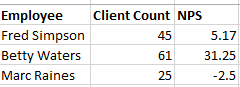
@Greg_Deckler Sure thing. It's pretty tricky to explain Smiley Happy So I have data that looks like this, on a small scale:
1.PNG 


Each employee has a number of clients they manage and what's called a NPS score. Based off of their client count, they get placed into one of these tiers:
1.PNG


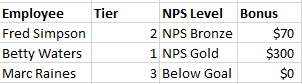
Fred has 45 clients, so he goes into tier 2. Fred's NPS is 5.17, so he is in the NPS Bronze category.

Betty has 61 clients, so she goes into tier 1. Betty's NPS is 31.25 so she is in the NPS Gold category.

Marc has 25 clients so he goes into tier 3. Marc's NPS is -2.5 so he is not in any category (Below Target Goal).


So that is what I'm looking for my final result to be:
1.PNG


I have to do the exact same thing for 2 other employee stats as well (Retention and Satisfaction) that are both styled the same way. Figured if I can figure this out for one of the pieces, the others can be set up similar. The end result will ultimately be a grand total field of adding together an employee's NPS Bonus, Retention Bonus, and Satisfaction Bonus. Let me know if I need to further clarify anything...


 

Helpful resources

Announcements
New to Fabric survey Carousel

New to Fabric Survey

If you have recently started exploring Fabric, we'd love to hear how it's going. Your feedback can help with product improvements.

Power BI DataViz World Championships carousel

Power BI DataViz World Championships - June 2026

A new Power BI DataViz World Championship is coming this June! Don't miss out on submitting your entry.

Join our Fabric User Panel

Join our Fabric User Panel

Share feedback directly with Fabric product managers, participate in targeted research studies and influence the Fabric roadmap.

March Power BI Update Carousel

Power BI Community Update - March 2026

Check out the March 2026 Power BI update to learn about new features.