Join us at FabCon Atlanta from March 16 - 20, 2026, for the ultimate Fabric, Power BI, AI and SQL community-led event. Save $200 with code FABCOMM.
Register now!The Power BI Data Visualization World Championships is back! Get ahead of the game and start preparing now! Learn more
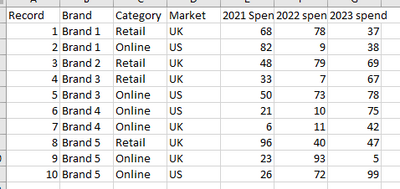
Hi, I have some data which are single record for different combinations with columns for yearly spend. Here's some mock data:
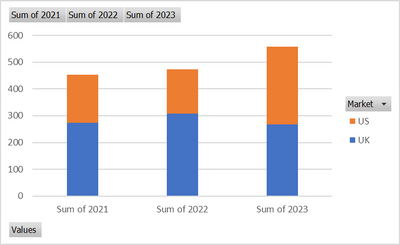
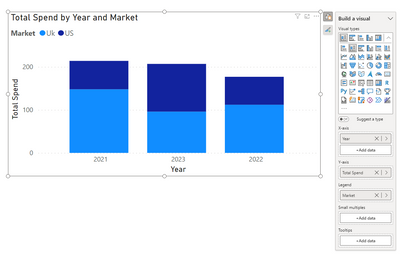
I want to be able to chart the data that each year is the X axis label then I can have the stacks as the Brand/Category/Market such as the below which I can do using a stack column and switch row/column when pivoting the data in excel.
Chart 1:
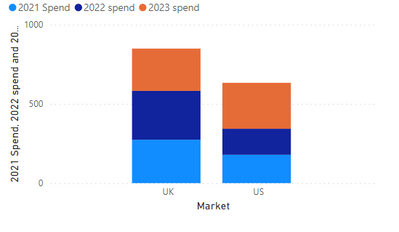
When I try to do this in power BI I can only get the following chart and can't figure out how to switch row/column
Chart 2:
Any way I can turn chart 2 into chart 1 in PowerBI?
Solved! Go to Solution.
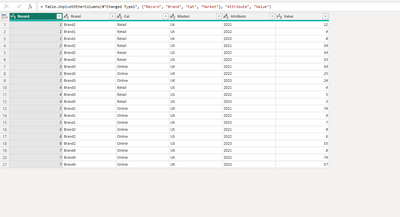
if the data you bringing is in the same format as your table above. Then you will need to pivot the data, by going into transform data and highlight the column years and go to the transform/Unpivot columns. Your data should look something like this now. close and apply Now you should be able to pivot the data in the format you want.
Check out the November 2025 Power BI update to learn about new features.
Advance your Data & AI career with 50 days of live learning, contests, hands-on challenges, study groups & certifications and more!
| User | Count |
|---|---|
| 57 | |
| 43 | |
| 41 | |
| 22 | |
| 17 |
| User | Count |
|---|---|
| 183 | |
| 114 | |
| 93 | |
| 62 | |
| 45 |