cancel
Showing results for 
Search instead for 
Did you mean: 

The Power BI Data Visualization World Championships is back! Get ahead of the game and start preparing now! Learn more

Reply
Anonymous
Not applicable

Summing the values from multiple columns

Hello,


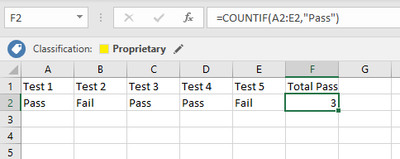
I have several columns of data which old a 'PASS' 'FAIL' or 'N/A' value.


I need to count per row the total 'PASS' values within all the columns.


So for example if Row A contained 12 PASSES and 6 FAILS, the new measure would show 12.


I can't seem to get a COUNTX to work but i'm probably not doing it right. 


Am I able to sum up a specific text value from multiple columns using DAX? 

1 ACCEPTED SOLUTION

@Anonymous


Here we have to create measure for each column. 


Pass Count = 

 calculate(counta( TableName(Column1)), TableName(Column1)="Pass") +

 calculate(counta( TableName(Column2)), TableName(Column2)="Pass") +

 calculate(counta( TableName(Column3)), TableName(Column3)="Pass") +

 calculate(counta( TableName(Column4)), TableName(Column4)="Pass") +

 calculate(counta( TableName(Column5)), TableName(Column5)="Pass") 


Note :

Replace Tablename and column name 

View solution in original post

6 REPLIES 6
Baskar
Resident Rockstar
Resident Rockstar

@Anonymous   can you please share some of sample data with expected result.

Anonymous
Not applicable

Sure @Baskar see attached screenshot. I guess my post wasn't as self-explanatory as I thought :robotindifferentSample.PNG

@Anonymous,


You may select Unpivot Columns in Query Editor first.

https://community.powerbi.com/t5/Desktop/matrix-to-table-help/td-p/329415

Community Support Team _ Sam Zha
If this post helps, then please consider Accept it as the solution to help the other members find it more quickly.

@Anonymous


Here we have to create measure for each column. 


Pass Count = 

 calculate(counta( TableName(Column1)), TableName(Column1)="Pass") +

 calculate(counta( TableName(Column2)), TableName(Column2)="Pass") +

 calculate(counta( TableName(Column3)), TableName(Column3)="Pass") +

 calculate(counta( TableName(Column4)), TableName(Column4)="Pass") +

 calculate(counta( TableName(Column5)), TableName(Column5)="Pass") 


Note :

Replace Tablename and column name 

Anonymous
Not applicable

Thanks @Baskar, it looks like this is summing columns, rather than rows? Each row in my dataset is an audit result,

So I actually don't care about the column totals at all, just the row totals. 

Therefore I figured I would have to create a new calculated column either in DAX or M to achieve this...

@Anonymous use the same formula to create calculated column, it will resolve your problem.

Helpful resources

Announcements
Power BI DataViz World Championships

Power BI Dataviz World Championships

The Power BI Data Visualization World Championships is back! Get ahead of the game and start preparing now!

December 2025 Power BI Update Carousel

Power BI Monthly Update - December 2025

Check out the December 2025 Power BI Holiday Recap!

FabCon Atlanta 2026 carousel

FabCon Atlanta 2026

Join us at FabCon Atlanta, March 16-20, for the ultimate Fabric, Power BI, AI and SQL community-led event. Save $200 with code FABCOMM.