I have the following logic, how do I get the sum rows to reflect what is displayed?
I have a slicer filtering the table below and the total isnt correct.
Here is my logic
MatrixFilteredhourlyData =
var datapercent=SUMMARIZE(loadshape,"rowcount",CALCULATE(countrows(ALLSELECTED(loadshape)),ALLEXCEPT(loadshape,_Dimdate[Fiscal Year],loadshape[Premise])))
VAR value1 = 'PercentSelect'[Percent Value]/100
return
IF((datapercent/[Dateinterval])>=value1,loadshape[Hourlyusagesum],blank())
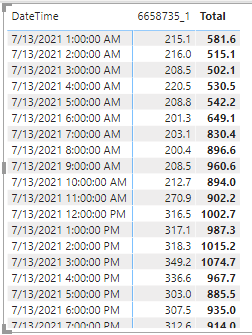
Things I've tried but didn't work..
sumx(ADDCOLUMNS(
SUMMARIZE(loadshape,loadshape[DateTime]),"Total",[MatrixFilteredhourlyData]),[MatrixFilteredhourlyData])
IF((([MatrixIntervalcount]/[Dateinterval])>=('PercentSelect'[Percent Value]/100)),[MatrixFilteredhourlyData],blank())
CALCULATE(SUM(loadshape[HourlyUsage]),(([MatrixIntervalcount]/[Dateinterval])>=('PercentSelect'[Percent Value]/100)))
SUMX(FILTER(loadshape,(([MatrixIntervalcount]/[Dateinterval])>=('PercentSelect'[Percent Value]/100))),loadshape[HourlyUsage])
SWITCH (
TRUE (),
[MatrixIntervalcount]/[Dateinterval]>=('PercentSelect'[Percent Value]/100), sum(loadshape[HourlyUsage]))
CALCULATE(SUM(loadshape[HourlyUsage]),FILTER(loadshape,([MatrixIntervalcount]/[Dateinterval]>=('PercentSelect'[Percent Value]/100))))
CALCULATE(countrows(ALLSELECTED(loadshape)),ALLEXCEPT(loadshape,_Dimdate[Fiscal Year],loadshape[Premise]))))


