
Don't miss your chance to take the Fabric Data Engineer (DP-600) exam for FREE! Find out how by attending the DP-600 session on April 23rd (pacific time), live or on-demand.
Learn moreNext up in the FabCon + SQLCon recap series: The roadmap for Microsoft SQL and Maximizing Developer experiences in Fabric. All sessions are available on-demand after the live show. Register now
Hi there,
I have two tables in my data model that contain marketing costs for our organisation. I would like to combine them into one table and summarize the cost per day. As both tables are different, i can't merge the queries (and i also would like to retain the individual tables).
Example:
Table A has marketing costs for 1/1, 2/1 and 4/1 for let's say 10 euro each.
Table B has marketing costs for 2/1, 3/1 and 5/1 for 10 euro each
Table C (the designated new table) would have:
1/1: 10
2/1: 20
3/1: 10
4/1: 10
5/1: 10
Can anyone explain me how to do that?
Thanks!
David
Solved! Go to Solution.
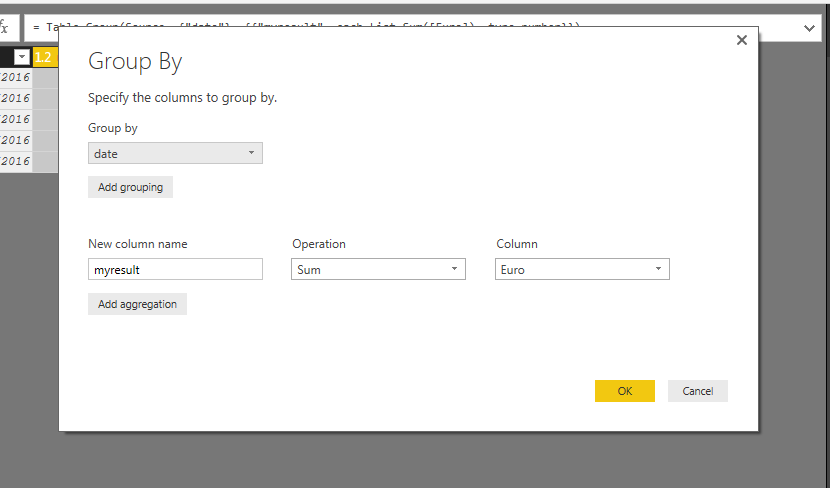
You can use Append to achieve this. Select Append as new Queries, Append Table B on the Table A and then You can do GROUPBY,
Group by Date, Operation Sum and Column is Euro. This will give you the desired result. See the attached screenshot.
Append as new queries
Groupby
Final outcome
Hi @david2,
That combining two tables can be easily achieved using DAX, please refer to below formulas to create new tables:
Table1 = UNION(TableA,TableB) TableC = SUMMARIZE(Table1,Table1[Date],"Costs",SUM(Table1[Costs]))
If you have any other question, please feel free to ask.
Best regards,
Yuliana Gu
Hi @david2,
That combining two tables can be easily achieved using DAX, please refer to below formulas to create new tables:
Table1 = UNION(TableA,TableB) TableC = SUMMARIZE(Table1,Table1[Date],"Costs",SUM(Table1[Costs]))
If you have any other question, please feel free to ask.
Best regards,
Yuliana Gu
Do the source tables have to be the same granularity (cardinality) for Union and Append to work?
You can use Append to achieve this. Select Append as new Queries, Append Table B on the Table A and then You can do GROUPBY,
Group by Date, Operation Sum and Column is Euro. This will give you the desired result. See the attached screenshot.
Append as new queries
Groupby
Final outcome
I have a similar query, but I would like to see values from Table A and Table B in seperate columns
If you have recently started exploring Fabric, we'd love to hear how it's going. Your feedback can help with product improvements.
A new Power BI DataViz World Championship is coming this June! Don't miss out on submitting your entry.
Share feedback directly with Fabric product managers, participate in targeted research studies and influence the Fabric roadmap.
| User | Count |
|---|---|
| 44 | |
| 43 | |
| 38 | |
| 18 | |
| 16 |
| User | Count |
|---|---|
| 67 | |
| 63 | |
| 30 | |
| 30 | |
| 23 |