
Get certified for free when you join Fabric Data Days 2026 and dive into Fabric, Power BI, SQL, AI, and other essential data skills.
Join nowTry your skills in the Power BI Dataviz World Championship! Round one ends June 26. Join now
Hi everyone...
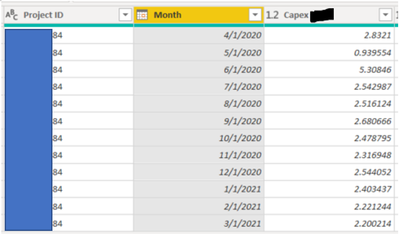
I want to summarize the Capex numbers in the below table, by Project ID, so I can then delete the "Month" column and then have only 1 row per Project ID. Does anyone know if this is possible in Query Editor? If so, what are the steps?
Thanks in advance to anyone who can assist.
Solved! Go to Solution.
@Anonymous You can use the Group By operation in Power Query Editor.
In DAX it is SUMMARIZE and GROUPBY
Hi @Anonymous ,
@Greg_Deckler is right. You could try “Group By”. Please take a look at the blog to have a try.
Grouping rows with Power BI / Power Query
@Anonymous You can use the Group By operation in Power Query Editor.
In DAX it is SUMMARIZE and GROUPBY
Don't miss out on Data Days, June 15 through August 7. Learn Fabric, Power BI, SQL, AI and more.
Check out the May 2026 Power BI update to learn about new features.
| User | Count |
|---|---|
| 24 | |
| 22 | |
| 21 | |
| 20 | |
| 14 |
| User | Count |
|---|---|
| 58 | |
| 52 | |
| 41 | |
| 33 | |
| 32 |