
Learn from the best! Meet the four finalists headed to the FINALS of the Power BI Dataviz World Championships! Register now
Hi everyone...
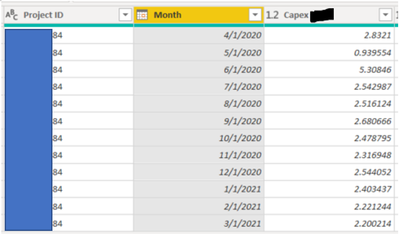
I want to summarize the Capex numbers in the below table, by Project ID, so I can then delete the "Month" column and then have only 1 row per Project ID. Does anyone know if this is possible in Query Editor? If so, what are the steps?
Thanks in advance to anyone who can assist.
Solved! Go to Solution.
@Anonymous You can use the Group By operation in Power Query Editor.
In DAX it is SUMMARIZE and GROUPBY
Hi @Anonymous ,
@Greg_Deckler is right. You could try “Group By”. Please take a look at the blog to have a try.
Grouping rows with Power BI / Power Query
@Anonymous You can use the Group By operation in Power Query Editor.
In DAX it is SUMMARIZE and GROUPBY
| User | Count |
|---|---|
| 59 | |
| 47 | |
| 31 | |
| 18 | |
| 17 |
| User | Count |
|---|---|
| 77 | |
| 66 | |
| 46 | |
| 22 | |
| 22 |