Join us at FabCon Atlanta from March 16 - 20, 2026, for the ultimate Fabric, Power BI, AI and SQL community-led event. Save $200 with code FABCOMM.
Register now!Learn from the best! Meet the four finalists headed to the FINALS of the Power BI Dataviz World Championships! Register now
Hi,
I have the following code:
_CumulativeFrequencyRateThisYear =
var _table = SUMMARIZECOLUMNS(
'EventYearMonth'[CalendarMonthId],
FILTER(
KEEPFILTERS(VALUES('EventYearMonth'[DateValue])),
AND(
'EventYearMonth'[DateValue] >= DATE(2022, 1, 1),
'EventYearMonth'[DateValue] < DATE(2023, 1, 1)
)),
"_CumulativeFrequencyRateLocal", 'SHEQ'[_CumulativeFrequencyRate]
)
RETURN
AVERAGEX(_table,[_CumulativeFrequencyRateLocal])
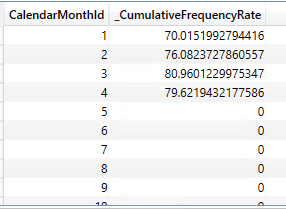
I want to return a visual such as:
However, when I place the measure in the visual with the 'EventYearMonth'[CalendarMonthId] as the axis I get the follwoing error:
SummarizeColumns() and AddMissingItems() may not be used in this context.
Any ideas?
Solved! Go to Solution.
The reason for this is that "SUMMARIZECOLUMNS cannot be used in a context transition. You could use it in a filter, but you cannot invoke SUMMARIZECOLUMNS in a measure because the measure is often called in a context transition." (From Marco's reply to a comment on this article.)
SUMMARIZECOLUMNS is great for writing DAX queries but if you're writing a measure, then you almost always need to use SUMMARIZE instead.
The reason for this is that "SUMMARIZECOLUMNS cannot be used in a context transition. You could use it in a filter, but you cannot invoke SUMMARIZECOLUMNS in a measure because the measure is often called in a context transition." (From Marco's reply to a comment on this article.)
SUMMARIZECOLUMNS is great for writing DAX queries but if you're writing a measure, then you almost always need to use SUMMARIZE instead.
@VendettaBob , try like
_CumulativeFrequencyRateThisYear =
var _table = ADDCOLUMNS(Summarize('SHEQ'
'EventYearMonth'[CalendarMonthId] ),
"_CumulativeFrequencyRateLocal", calculate('SHEQ'[_CumulativeFrequencyRate],FILTER(
KEEPFILTERS(VALUES('EventYearMonth'[DateValue])),
AND(
'EventYearMonth'[DateValue] >= DATE(2022, 1, 1),
'EventYearMonth'[DateValue] < DATE(2023, 1, 1)
)) ))
)
RETURN
AVERAGEX(_table,[_CumulativeFrequencyRateLocal])
Share feedback directly with Fabric product managers, participate in targeted research studies and influence the Fabric roadmap.
Check out the February 2026 Power BI update to learn about new features.
| User | Count |
|---|---|
| 66 | |
| 58 | |
| 45 | |
| 19 | |
| 15 |