Join the FabCon + SQLCon recap series. Up next: Power BI, Real-Time Intelligence, IQ and AI, and Data Factory take center stage. All sessions are available on-demand after the live show. Register now
I am stuck with an issue I cant seem to figure out how to do in DAX. Since users will select filters in PowerBI Services, I can't do this in Power Query/M as some materials would be filtered out and would require a change to the summary result table. Any assistance would be appreciated.
I have a set of data like below (but with many more rules & materials)
Material Rule-1 Rule-2 Rule-3
A Pass Fail N/A
B Fail Pass Pass
C N/A Fail Pass
And I want to create a table like
Status Rule-1 Rule-2 Rule-3
Pass 1 1 2
Fail 1 2 0
N/A 1 0 1
or it could be pivoted (rules down left and Pass, Fail, N/A across top) does not matter.
How would I accomplish this?
To unpivot a table using DAX is quite challenging. You may want to try the following steps in DAX to get your desired result.
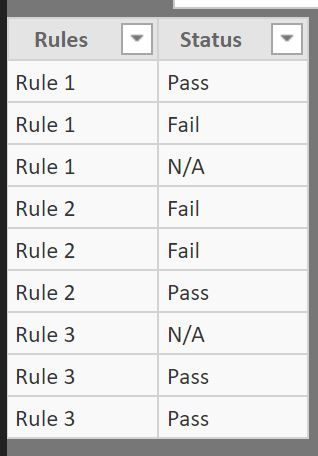
1. Creating a new table with two columns, 'Rules' and 'Status'

Sorry for confussion, but I need to create a summary table in DAX, because i am pushing to R which is limited to 150,000 rows and my data set is 3 million records and increasing. So, i cant use a widget (like a matrix) to summarize the data.
Hi @Anonymous,
You can get it with the formula below. But this calculated table is relative stable, which means its values can't change as the filters or slicers change.
Table = ADDCOLUMNS ( DISTINCT ( UNION ( VALUES ( Table1[Rule-1] ), VALUES ( Table1[Rule-2] ), VALUES ( Table1[Rule-3] ) ) ), "Rule-1-num", CALCULATE ( COUNT ( Table1[Rule-1] ), FILTER ( 'Table1', 'Table1'[Rule-1] = EARLIER ( 'Table1'[Rule-1] ) ) ), "Rule-2-num", CALCULATE ( COUNT ( Table1[Rule-2] ), FILTER ( 'Table1', 'Table1'[Rule-2] = EARLIER ( [Rule-1] ) ) ), "Rule-3-num", CALCULATE ( COUNT ( Table1[Rule-3] ), FILTER ( 'Table1', 'Table1'[Rule-3] = EARLIER ( Table1[Rule-1] ) ) ) )
Best Regards,
I was able to get your solution to work, but as you mentioned when a user filters with a slicer the summary table does not update. This update is a key feature for my solution. Is there no way to create a table in dax that is updateable based on user selections?
Check out the April 2026 Power BI update to learn about new features.
If you have recently started exploring Fabric, we'd love to hear how it's going. Your feedback can help with product improvements.
A new Power BI DataViz World Championship is coming this June! Don't miss out on submitting your entry.
| User | Count |
|---|---|
| 42 | |
| 37 | |
| 35 | |
| 22 | |
| 15 |
| User | Count |
|---|---|
| 67 | |
| 58 | |
| 29 | |
| 27 | |
| 25 |