Join us at FabCon Atlanta from March 16 - 20, 2026, for the ultimate Fabric, Power BI, AI and SQL community-led event. Save $200 with code FABCOMM.
Register now!The Power BI Data Visualization World Championships is back! Get ahead of the game and start preparing now! Learn more
Hi I have a dataset as below
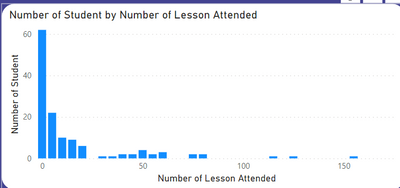
My objective is to create a histogram to calculate the number of students vs number of attendances as below. This histogram has to be dynamic to slicer date range
| Student ID | Attendance Date |
| 1 | 20/Jan/2022 |
| 2 | 20/Jan/2022 |
| 1 | 20/Jan/2022 |
| 2 | 21/Jan/2022 |
| 2 | 21/Jan/2022 |
| 3 | 21/Jan/2022 |
| 3 | 21/Jan/2022 |
| 4 | 22/Jan/2022 |
| 3 | 22/Jan/2022 |
| 4 | 22/Jan/2022 |
My main idea is to create a group for my X axis
| Group | Min Value | Max Value |
| 0 - 10 | 0 | 10 |
| 10 - 20 | 10 | 20 |
| 20 - 30 | 20 | 30 |
| 30 - 40 | 30 | 40 |
| 40 - 50 | 40 | 50 |
| 50 - 60 | 50 | 60 |
| 60 - 70 | 60 | 70 |
| 70 - 80 | 70 | 80 |
| 80 - 90 | 80 | 90 |
Then link the Group and a dynamic Summarize Table.
However I cant insert ["Total Attendance"] in the Summarize Column into XX. Please advise
Measure =
VAR Table = SUMMARIZE(Data, Data[Student ID], "Total Attendance", COUNTROWS(Data) )
VAR Result = COUNTROWS( FILTER(MasterGroup, MasterGroup[Min Value] < XX && MasterGroup[Max Value] >= XX ) )
RETURN Result
Solved! Go to Solution.
@j_gan2022 , Sorry Some mistake
Option one is a new table
If you need measure
meausre =
VAR _table = SUMMARIZE(Data, Data[Student ID], "Total Attendance", COUNTROWS(Data) )
var _count = countx(filter(_table, [Total Attendance] >=Min(MasterGroup[Min Value] ) && [Total Attendance] <=max(MasterGroup[Max Value] )),[Student ID])
return
_count
------
If you need table
Table =
VAR Table = SUMMARIZE(Data, Data[Student ID], "Total Attendance", COUNTROWS(Data) )
return
Addcolumns(Table , "Bucket"
[Total Attendance] <= 10, " 0 -10" ,
[Total Attendance] <= 20, " 10 -20" ,
[Total Attendance] <= 30, " 20 -30" ,
[Total Attendance] <= 40, " 40 -40" ,
//Add other
)
Thanks the Measure works.!
@j_gan2022 , You should use add columns and add between range
Var Result = Addcolumns(Table , "Bucket"
[Table] <= 10, " 0 -10" ,
[Table] <= 20, " 10 -20" ,
[Table] <= 30, " 20 -30" ,
[Table] <= 40, " 40 -40" ,
//Add other
)
or explore this , place of margin you have total student
Dynamic Segmentation Bucketing Binning
https://community.powerbi.com/t5/Quick-Measures-Gallery/Dynamic-Segmentation-Bucketing-Binning/m-p/1...
Dynamic Segmentation, Bucketing or Binning: https://youtu.be/CuczXPj0N-k
@amitchandak sorry i dont understand how this works.
Var Result = Addcolumns(Table , "Bucket"
[Table] <= 10, " 0 -10" ,
[Table] <= 20, " 10 -20" ,
[Table] <= 30, " 20 -30" ,
[Table] <= 40, " 40 -40" ,
//Add other
)
How do i link it to my group? Please advise. Thanks. I need it to be able to change according to slicer.
@j_gan2022 , Sorry Some mistake
Option one is a new table
If you need measure
meausre =
VAR _table = SUMMARIZE(Data, Data[Student ID], "Total Attendance", COUNTROWS(Data) )
var _count = countx(filter(_table, [Total Attendance] >=Min(MasterGroup[Min Value] ) && [Total Attendance] <=max(MasterGroup[Max Value] )),[Student ID])
return
_count
------
If you need table
Table =
VAR Table = SUMMARIZE(Data, Data[Student ID], "Total Attendance", COUNTROWS(Data) )
return
Addcolumns(Table , "Bucket"
[Total Attendance] <= 10, " 0 -10" ,
[Total Attendance] <= 20, " 10 -20" ,
[Total Attendance] <= 30, " 20 -30" ,
[Total Attendance] <= 40, " 40 -40" ,
//Add other
)
The Power BI Data Visualization World Championships is back! Get ahead of the game and start preparing now!
| User | Count |
|---|---|
| 40 | |
| 37 | |
| 33 | |
| 29 | |
| 27 |
| User | Count |
|---|---|
| 134 | |
| 104 | |
| 63 | |
| 60 | |
| 55 |