Join us at FabCon Atlanta from March 16 - 20, 2026, for the ultimate Fabric, Power BI, AI and SQL community-led event. Save $200 with code FABCOMM.
Register now!Vote for your favorite vizzies from the Power BI Dataviz World Championship submissions. Vote now!
Hi I have a dataset as below
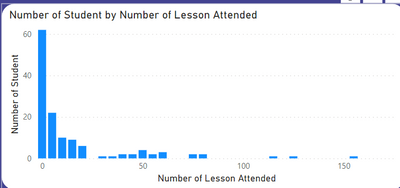
My objective is to create a histogram to calculate the number of students vs number of attendances as below. This histogram has to be dynamic to slicer date range
| Student ID | Attendance Date |
| 1 | 20/Jan/2022 |
| 2 | 20/Jan/2022 |
| 1 | 20/Jan/2022 |
| 2 | 21/Jan/2022 |
| 2 | 21/Jan/2022 |
| 3 | 21/Jan/2022 |
| 3 | 21/Jan/2022 |
| 4 | 22/Jan/2022 |
| 3 | 22/Jan/2022 |
| 4 | 22/Jan/2022 |
My main idea is to create a group for my X axis
| Group | Min Value | Max Value |
| 0 - 10 | 0 | 10 |
| 10 - 20 | 10 | 20 |
| 20 - 30 | 20 | 30 |
| 30 - 40 | 30 | 40 |
| 40 - 50 | 40 | 50 |
| 50 - 60 | 50 | 60 |
| 60 - 70 | 60 | 70 |
| 70 - 80 | 70 | 80 |
| 80 - 90 | 80 | 90 |
Then link the Group and a dynamic Summarize Table.
However I cant insert ["Total Attendance"] in the Summarize Column into XX. Please advise
Measure =
VAR Table = SUMMARIZE(Data, Data[Student ID], "Total Attendance", COUNTROWS(Data) )
VAR Result = COUNTROWS( FILTER(MasterGroup, MasterGroup[Min Value] < XX && MasterGroup[Max Value] >= XX ) )
RETURN Result
Solved! Go to Solution.
@j_gan2022 , Sorry Some mistake
Option one is a new table
If you need measure
meausre =
VAR _table = SUMMARIZE(Data, Data[Student ID], "Total Attendance", COUNTROWS(Data) )
var _count = countx(filter(_table, [Total Attendance] >=Min(MasterGroup[Min Value] ) && [Total Attendance] <=max(MasterGroup[Max Value] )),[Student ID])
return
_count
------
If you need table
Table =
VAR Table = SUMMARIZE(Data, Data[Student ID], "Total Attendance", COUNTROWS(Data) )
return
Addcolumns(Table , "Bucket"
[Total Attendance] <= 10, " 0 -10" ,
[Total Attendance] <= 20, " 10 -20" ,
[Total Attendance] <= 30, " 20 -30" ,
[Total Attendance] <= 40, " 40 -40" ,
//Add other
)
Thanks the Measure works.!
@j_gan2022 , You should use add columns and add between range
Var Result = Addcolumns(Table , "Bucket"
[Table] <= 10, " 0 -10" ,
[Table] <= 20, " 10 -20" ,
[Table] <= 30, " 20 -30" ,
[Table] <= 40, " 40 -40" ,
//Add other
)
or explore this , place of margin you have total student
Dynamic Segmentation Bucketing Binning
https://community.powerbi.com/t5/Quick-Measures-Gallery/Dynamic-Segmentation-Bucketing-Binning/m-p/1...
Dynamic Segmentation, Bucketing or Binning: https://youtu.be/CuczXPj0N-k
@amitchandak sorry i dont understand how this works.
Var Result = Addcolumns(Table , "Bucket"
[Table] <= 10, " 0 -10" ,
[Table] <= 20, " 10 -20" ,
[Table] <= 30, " 20 -30" ,
[Table] <= 40, " 40 -40" ,
//Add other
)
How do i link it to my group? Please advise. Thanks. I need it to be able to change according to slicer.
@j_gan2022 , Sorry Some mistake
Option one is a new table
If you need measure
meausre =
VAR _table = SUMMARIZE(Data, Data[Student ID], "Total Attendance", COUNTROWS(Data) )
var _count = countx(filter(_table, [Total Attendance] >=Min(MasterGroup[Min Value] ) && [Total Attendance] <=max(MasterGroup[Max Value] )),[Student ID])
return
_count
------
If you need table
Table =
VAR Table = SUMMARIZE(Data, Data[Student ID], "Total Attendance", COUNTROWS(Data) )
return
Addcolumns(Table , "Bucket"
[Total Attendance] <= 10, " 0 -10" ,
[Total Attendance] <= 20, " 10 -20" ,
[Total Attendance] <= 30, " 20 -30" ,
[Total Attendance] <= 40, " 40 -40" ,
//Add other
)
Vote for your favorite vizzies from the Power BI World Championship submissions!
If you love stickers, then you will definitely want to check out our Community Sticker Challenge!
Check out the January 2026 Power BI update to learn about new features.
| User | Count |
|---|---|
| 57 | |
| 52 | |
| 45 | |
| 17 | |
| 16 |
| User | Count |
|---|---|
| 109 | |
| 108 | |
| 40 | |
| 33 | |
| 26 |