Get certified for free when you join Fabric Data Days 2026 and dive into Fabric, Power BI, SQL, AI, and other essential data skills.
Join nowJuly 7 - July 17 | Round 2 of the Power BI Dataviz World Championships. Don't miss your chance! Learn more
Hello,
I have the following table as a result of a SQL query in Power Bi and after i created a measure to have distincts by ID and value.
I now want to be able to create another table out of it to show the counts by department like below:(WANT:1)--Do i start from Query1 again? or can we use the existing table? if so how can i do that???
Also another table to show counts by Month like shown:
HAVE:
ID value Department Month
101 0 Road Transport Jun2016
102 0 Aviation Jul2017
103 5 Aviation Aug2017
104 0 Aviation Aug2016
105 1 Ship jan2016
106 4 Mail Feb2017
107 4 Mail Mar2016
108 4 Walk Mar2016
WANT-1:
Department COUNT
Road Transport 1
Aviation 3
Ship 1
Mail 2
Walk 1
WANT-2:
Month COUNT
Jan2016 1
Mar2016 2
Jun2016 1
Aug2016 1
Feb2017 1
Aug2017 1
Thanks
Solved! Go to Solution.
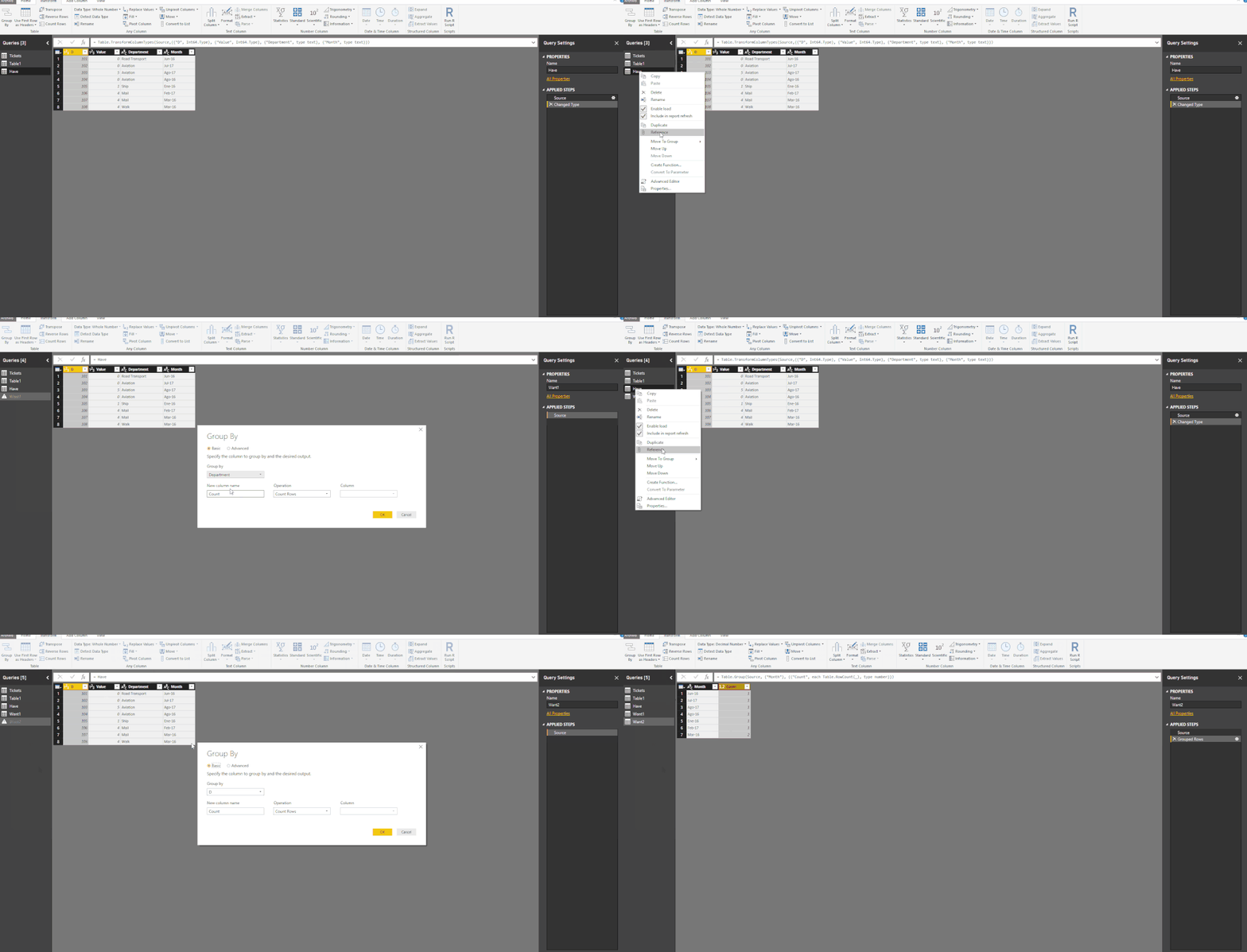
Hi, Go to Edit Query and Use Group By (in Transform Tab).
Follow the steps:
Group By
Regards,
Victor
Lima - Peru
Hi, Go to Edit Query and Use Group By (in Transform Tab).
Follow the steps:
Group By
Regards,
Victor
Lima - Peru
Thanks you Lima. That was so nice of you to have it in the form of a video. It helps a lot and is what i wanted also.
Just curious , can this also be done using DAX? If so how and which one do you prefer?
Thanks
In Dax is also possible.
To Create New Tables Using a original table i prefer Query Editor. They insert in to the model.
But if you want to just show in a visual (Not Create a table) with DAX is very simple to obtain.
Join us in Barcelona for FabCon and SQLCon, the Fabric, Power BI, SQL, and AI community event. Save €200 with code FABCMTY200.
Join Data Days 2026: 60 days of free live/on-demand sessions, challenges, study groups, and certification opportunities.
| User | Count |
|---|---|
| 27 | |
| 23 | |
| 18 | |
| 18 | |
| 15 |
| User | Count |
|---|---|
| 54 | |
| 44 | |
| 42 | |
| 39 | |
| 36 |