Join us at FabCon Atlanta from March 16 - 20, 2026, for the ultimate Fabric, Power BI, AI and SQL community-led event. Save $200 with code FABCOMM.
Register now!The Power BI Data Visualization World Championships is back! Get ahead of the game and start preparing now! Learn more
I want to look at all the assignment we have in a table.
In this table I want to see price for all the closed assignments the month it was closed.
The table also have multiple assignments that have not been closed yet and they need to be in the table so I cannot just remove them with a filter.
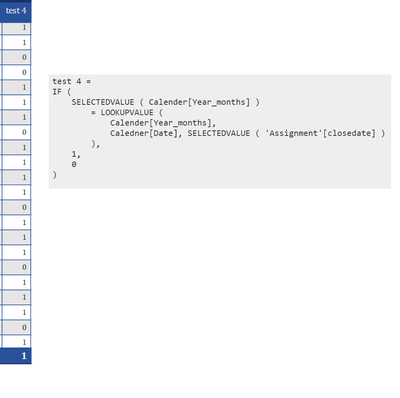
So I have made this filter to see which assignments has been closed in a give month it returns 1 if it has been closed and 0 if it hasn't been closed this month.
But the sum also 1 which means that it includeds the price for all values. See screenshot.
Is there something I can do to only add the value in the sum for the rows where the 1 is shown and not all of them?
Solved! Go to Solution.
Try this measure
test= IF(HASONEVALUE('calendar'[label]),[test 4],sumx('Assignment',[test 4]))
Best Regards,
Community Support Team _Tang
If this post helps, please consider Accept it as the solution to help the other members find it more quickly.
Try this measure
test= IF(HASONEVALUE('calendar'[label]),[test 4],sumx('Assignment',[test 4]))
Best Regards,
Community Support Team _Tang
If this post helps, please consider Accept it as the solution to help the other members find it more quickly.
The Power BI Data Visualization World Championships is back! Get ahead of the game and start preparing now!
| User | Count |
|---|---|
| 41 | |
| 38 | |
| 36 | |
| 31 | |
| 28 |
| User | Count |
|---|---|
| 129 | |
| 88 | |
| 79 | |
| 68 | |
| 63 |