This time we’re going bigger than ever. Fabric, Power BI, SQL, AI and more. We're covering it all. You won't want to miss it.
Learn moreLevel up your Power BI skills this month - build one visual each week and tell better stories with data! Get started
Hi everyone,
Is there any alternative DAX fomula for this following formula ""
Solved! Go to Solution.
Hi @Anonymous ,
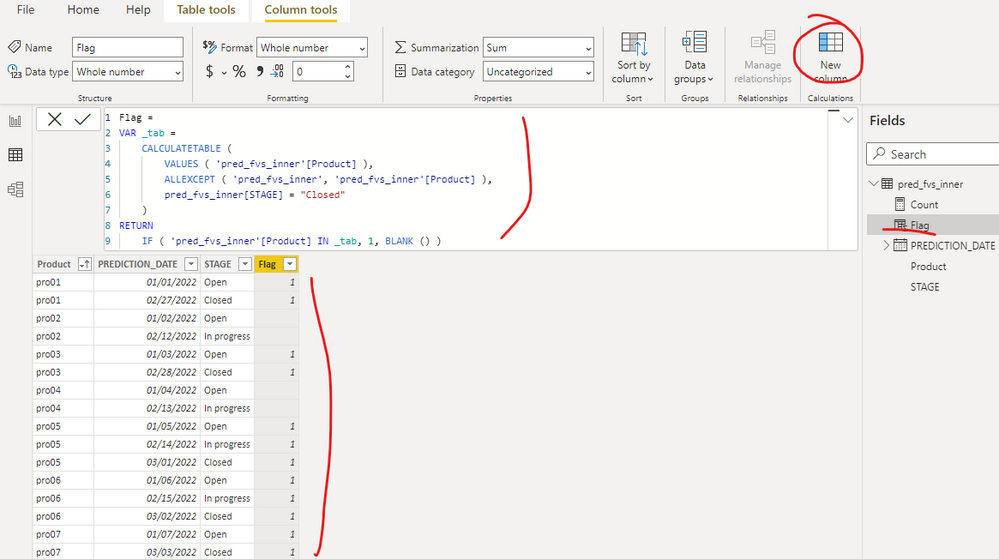
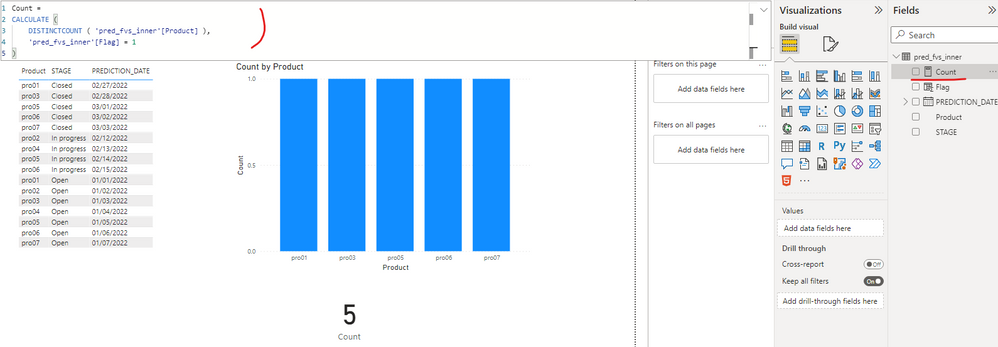
I created a sample pbix file(see attachment) for you, please check whether that is what you want. You can create a calculated column as below:
Flag =
VAR _tab =
CALCULATETABLE (
VALUES ( 'pred_fvs_inner'[Product] ),
ALLEXCEPT ( 'pred_fvs_inner', 'pred_fvs_inner'[Product] ),
pred_fvs_inner[STAGE] = "Closed"
)
RETURN
IF ( 'pred_fvs_inner'[Product] IN _tab, 1, BLANK () )
If the above one can't help you get the desired result, please provide some sample data in your tables (exclude sensitive data) with Text format and your expected result with backend logic and special examples. It is better if you can share a simplified pbix file. You can refer the following link to upload the file to the community. Thank you.
How to upload PBI in Community
Best Regards
Hi @Anonymous ,
I created a sample pbix file(see attachment) for you, please check whether that is what you want. You can create a calculated column as below:
Flag =
VAR _tab =
CALCULATETABLE (
VALUES ( 'pred_fvs_inner'[Product] ),
ALLEXCEPT ( 'pred_fvs_inner', 'pred_fvs_inner'[Product] ),
pred_fvs_inner[STAGE] = "Closed"
)
RETURN
IF ( 'pred_fvs_inner'[Product] IN _tab, 1, BLANK () )
If the above one can't help you get the desired result, please provide some sample data in your tables (exclude sensitive data) with Text format and your expected result with backend logic and special examples. It is better if you can share a simplified pbix file. You can refer the following link to upload the file to the community. Thank you.
How to upload PBI in Community
Best Regards
Check out the April 2026 Power BI update to learn about new features.
Sign up to receive a private message when registration opens and key events begin.
If you have recently started exploring Fabric, we'd love to hear how it's going. Your feedback can help with product improvements.
| User | Count |
|---|---|
| 34 | |
| 29 | |
| 29 | |
| 21 | |
| 18 |
| User | Count |
|---|---|
| 69 | |
| 48 | |
| 33 | |
| 24 | |
| 24 |