cancel
Showing results for 
Search instead for 
Did you mean: 

The Power BI Data Visualization World Championships is back! It's time to submit your entry. Live now!

Reply
Anonymous
Not applicable

ALLEXCEPT function alternative

Hi everyone,


Is there any alternative DAX fomula for this following formula   ""

CALCULATE(DISTINCTCOUNT(pred_fvs_inner[Product]),pred_fvs_inner[STAGE]="Closed",FILTER(pred_fvs_inner,
pred_fvs_inner[PREDICTION_DATE]=CALCULATE(max(pred_fvs_inner[PREDICTION_DATE]),
allexcept(pred_fvs_inner,pred_fvs_inner[Product])))))  ""  .
 
I am able to get the expeted output with the above formula but its not showing the correct product names with respective to the count.
 
Requirement: I want to calculate total count of products which got closed on each date and I have to show those product names in other chart when we click on count.
 
Appreciate your answer.
1 ACCEPTED SOLUTION
Anonymous
Not applicable

Hi  @Anonymous ,

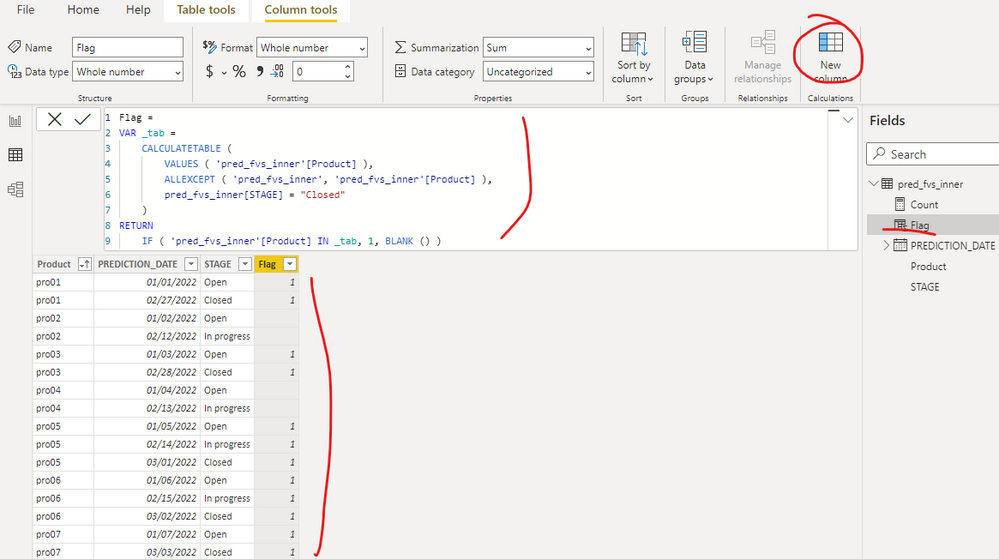
I created a sample pbix file(see attachment) for you, please check whether that is what you want. You can create a calculated column as below:

Flag =
VAR _tab =
    CALCULATETABLE (
        VALUES ( 'pred_fvs_inner'[Product] ),
        ALLEXCEPT ( 'pred_fvs_inner', 'pred_fvs_inner'[Product] ),
        pred_fvs_inner[STAGE] = "Closed"
    )
RETURN
    IF ( 'pred_fvs_inner'[Product] IN _tab, 1, BLANK () )

yingyinr_0-1655105718414.png

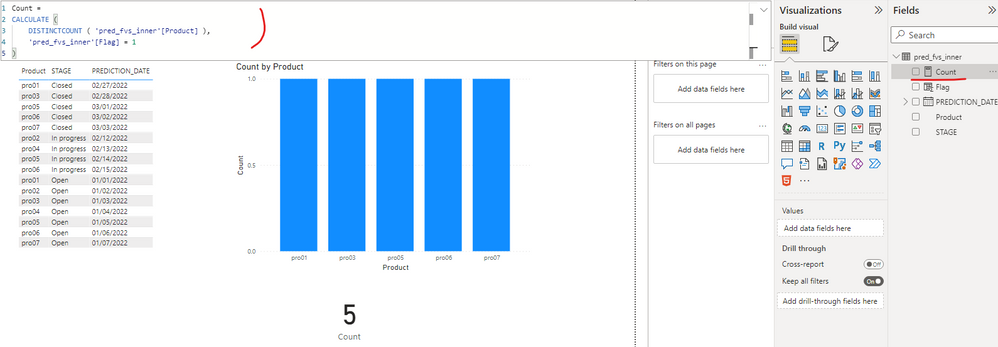
yingyinr_1-1655105802428.png

If the above one can't help you get the desired result, please provide some sample data in your tables (exclude sensitive data) with Text format and your expected result with backend logic and special examples. It is better if you can share a simplified pbix file. You can refer the following link to upload the file to the community. Thank you.

How to upload PBI in Community

Best Regards

View solution in original post

1 REPLY 1
Anonymous
Not applicable

Hi  @Anonymous ,

I created a sample pbix file(see attachment) for you, please check whether that is what you want. You can create a calculated column as below:

Flag =
VAR _tab =
    CALCULATETABLE (
        VALUES ( 'pred_fvs_inner'[Product] ),
        ALLEXCEPT ( 'pred_fvs_inner', 'pred_fvs_inner'[Product] ),
        pred_fvs_inner[STAGE] = "Closed"
    )
RETURN
    IF ( 'pred_fvs_inner'[Product] IN _tab, 1, BLANK () )

yingyinr_0-1655105718414.png

yingyinr_1-1655105802428.png

If the above one can't help you get the desired result, please provide some sample data in your tables (exclude sensitive data) with Text format and your expected result with backend logic and special examples. It is better if you can share a simplified pbix file. You can refer the following link to upload the file to the community. Thank you.

How to upload PBI in Community

Best Regards

Helpful resources

Announcements
Power BI DataViz World Championships

Power BI Dataviz World Championships

The Power BI Data Visualization World Championships is back! It's time to submit your entry.

December 2025 Power BI Update Carousel

Power BI Monthly Update - December 2025

Check out the December 2025 Power BI Holiday Recap!

FabCon Atlanta 2026 carousel

FabCon Atlanta 2026

Join us at FabCon Atlanta, March 16-20, for the ultimate Fabric, Power BI, AI and SQL community-led event. Save $200 with code FABCOMM.