Join us at FabCon Atlanta from March 16 - 20, 2026, for the ultimate Fabric, Power BI, AI and SQL community-led event. Save $200 with code FABCOMM.
Register now!The Power BI Data Visualization World Championships is back! It's time to submit your entry. Live now!
Hello guys,
Been awhile since I have been around PowerBI, I have a basic question.
I have the two following measures:
Total Sales = SUM(FactInternetSales[SalesAmount])
ALL Sales = CALCULATE([Total Sales];ALL(DimProduct[EnglishProductName]))
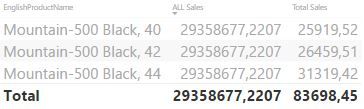
This is yielding the following table.
So, ALL Sales is basically it is giving me the sum of all products, instead of the sum of the 3 report filtered product I have chosen.
My expected result was 83698,45 to every row.
What rookie mistake am I doing here?
Appreciate the help!!
Solved! Go to Solution.
@Anonymous
Hi, Try with:
ALL Sales = CALCULATE([Total Sales];ALLSELECTED(DimProduct[EnglishProductName]))
@Anonymous
Hi, Try with:
ALL Sales = CALCULATE([Total Sales];ALLSELECTED(DimProduct[EnglishProductName]))
Thank you very much for the reply.
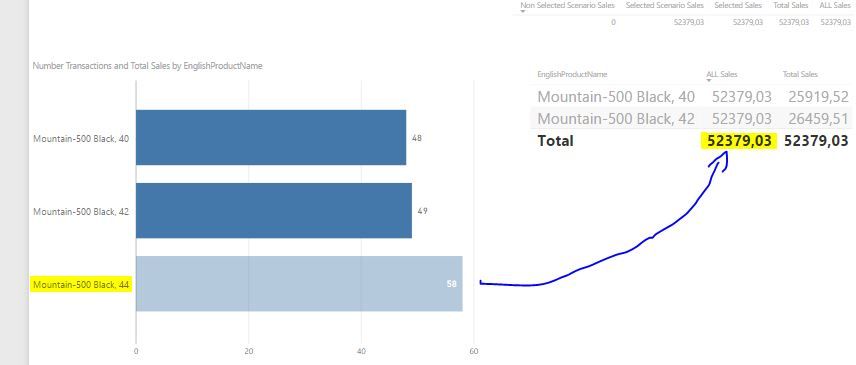
One more question, is it possible to add only to the grand total the sum of sales of the product highlighted as yellow ?
Thank you once again.
Hi,
SUM = Like excel sum of all the rows
SUMX = calculate sum by multiplying each raw by raw
ALL = What all function does is it ignores all the filters and calculate the sum as your using calculate function. (this act as a filter)
ALLEXCEPT = this function ignores all filters other than the field which you select
Useful links on popular DAX functions are as follows,
https://www.youtube.com/playlist?list=PLDz00l_jz6zym_YP8ZW11o52niGfCP8pN
https://msdn.microsoft.com/en-us/library/ee634396.aspx
Hope this helps
The Power BI Data Visualization World Championships is back! It's time to submit your entry.
Check out the January 2026 Power BI update to learn about new features.
| User | Count |
|---|---|
| 61 | |
| 49 | |
| 30 | |
| 25 | |
| 23 |
| User | Count |
|---|---|
| 128 | |
| 102 | |
| 57 | |
| 39 | |
| 31 |