Learn from the best! Meet the four finalists headed to the FINALS of the Power BI Dataviz World Championships! Register now
Hi guys!
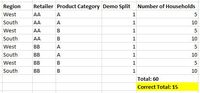
I've got the following data table.
I need to create a measure to calculate the total number of households.
The number of households changes only on Regional and Demographical levels. In the picture above, we can see Demo Group - 1 and two regions - West and South. Power BI, however, sums it up at every level, i.e. total is 60.
I would greatly appreciate any help on this!!
Thank you!
Solved! Go to Solution.
Hello @mar100
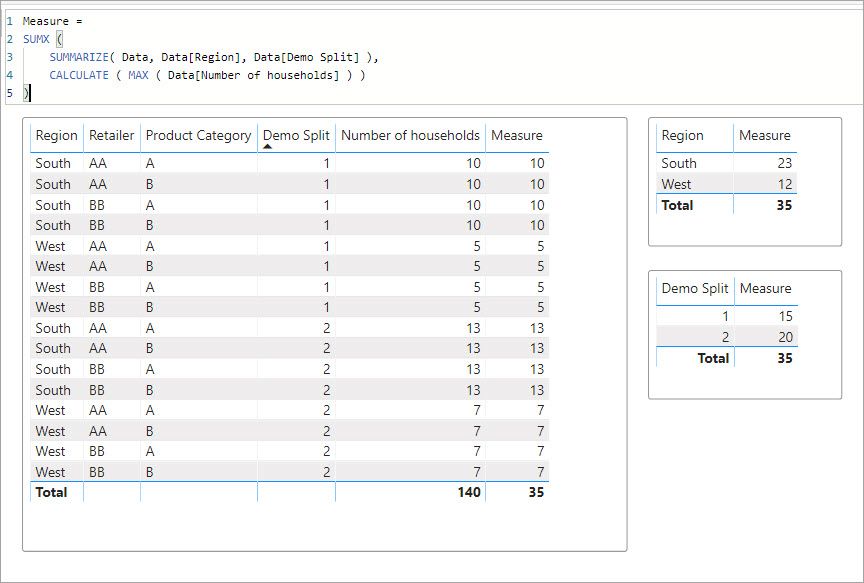
This measure should get you what you are looking for. I tested it with an additional demo split add to check. You will just have to change thename of your table.
Measure =
SUMX (
SUMMARIZE( Data, Data[Region], Data[Demo Split] ),
CALCULATE ( MAX ( Data[Number of households] ) )
)
If this solves your issues please mark it as the solution. Kudos 👍 are nice too.
Hello @mar100
This measure should get you what you are looking for. I tested it with an additional demo split add to check. You will just have to change thename of your table.
Measure =
SUMX (
SUMMARIZE( Data, Data[Region], Data[Demo Split] ),
CALCULATE ( MAX ( Data[Number of households] ) )
)
If this solves your issues please mark it as the solution. Kudos 👍 are nice too.
Thank you so much!! You are a life saviour! 🙂
If you have recently started exploring Fabric, we'd love to hear how it's going. Your feedback can help with product improvements.
A new Power BI DataViz World Championship is coming this June! Don't miss out on submitting your entry.
Share feedback directly with Fabric product managers, participate in targeted research studies and influence the Fabric roadmap.
| User | Count |
|---|---|
| 57 | |
| 33 | |
| 33 | |
| 18 | |
| 16 |
| User | Count |
|---|---|
| 66 | |
| 64 | |
| 44 | |
| 30 | |
| 29 |