Join us at FabCon Atlanta from March 16 - 20, 2026, for the ultimate Fabric, Power BI, AI and SQL community-led event. Save $200 with code FABCOMM.
Register now!The Power BI Data Visualization World Championships is back! Get ahead of the game and start preparing now! Learn more
Hi Experts,
I'm trying to do a dynamic sum based on time periods selected to compare changes over the time period. The problem I'm having is that I need to be able to only sum sales when a store is present in both the pre and post time periods.
My data is structured as follows:
| Store | Item | Sales | Time Period |
| 1 | Item A | 243 | Q2 2023 |
| 1 | Item B | 200 | Q2 2023 |
| 1 | Item C | 195 | Q2 2023 |
| 2 | Item A | 377 | Q2 2023 |
| 2 | Item B | 158 | Q2 2023 |
| 2 | Item C | 235 | Q2 2023 |
| 2 | Item D | 374 | Q2 2023 |
| 3 | Item A | 245 | Q2 2023 |
| 3 | Item B | 116 | Q2 2023 |
| 3 | Item C | 392 | Q2 2023 |
| 2 | Item A | 287 | Q1 2023 |
| 2 | Item B | 188 | Q1 2023 |
| 2 | Item C | 114 | Q1 2023 |
| 2 | Item D | 398 | Q1 2023 |
| 3 | Item A | 148 | Q1 2023 |
| 3 | Item B | 325 | Q1 2023 |
| 3 | Item C | 214 | Q1 2023 |
| 4 | Item A | 348 | Q1 2023 |
| 4 | Item B | 298 | Q1 2023 |
My tables are setup as follows:
Formulas for Post Period Sales and Pre Period Sales are as follows:
Post Period Sales =
CALCULATE(
SUM(FactSales[Sales]),
GROUPBY(DimItem, DimItem[Item])
)
Pre Period Sales =
CALCULATE(
SUM(FactSales[Sales]),
REMOVEFILTERS(DimTimePeriod[Time Period]),
GROUPBY(DimItem, DimItem[Item]),
USERELATIONSHIP(FactSales[Time Period], DimTimePeriodCompare[Time Period])
)
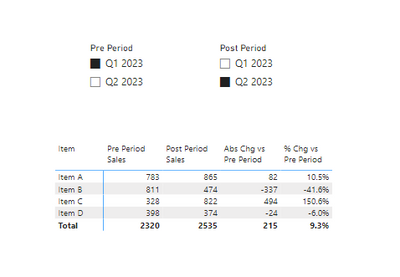
Layout on canvas for simple table would have the DimTimePeriod and DimTimePeriodComparison in slicers so the end user can select which time periods they want to compare.
How can I adjust my formulas to omit any stores that do not appear in both time periods? The above example currently shows sum of sales for all stores, but Stores 1 and 4 are not in both time periods.
Solved! Go to Solution.
For anyone that comes across this post, I was able to work out how to do it using an INTERSECT function and some clever filtering.
Pre Period Sales =
VAR PreStores =
CALCULATETABLE (
VALUES ( FactSales[Store] ),
ALLCROSSFILTERED(FactSales),
USERELATIONSHIP ( FactSales[Time Period], DimTimePeriodCompare[Time Period] ),
FILTERS(DimTimePeriodCompare[Time Period])
)
VAR PostStores =
CALCULATETABLE(
VALUES ( FactSales[Store] ),
ALLCROSSFILTERED(FactSales),
FILTERS(DimTimePeriod[Time Period]))
VAR CommonStores =
INTERSECT ( PreStores, PostStores )
RETURN
CALCULATE(
SUM(FactSales[Sales]),
REMOVEFILTERS(DimTimePeriod[Time Period]),
GROUPBY(DimItem, DimItem[Item]),
USERELATIONSHIP(FactSales[Time Period], DimTimePeriodCompare[Time Period]),
INTERSECT(CommonStores, VALUES(DimStore[Store])
))
Post Period Sales =
VAR PreStores =
CALCULATETABLE (
VALUES ( FactSales[Store] ),
ALLCROSSFILTERED(FactSales),
USERELATIONSHIP ( FactSales[Time Period], DimTimePeriodCompare[Time Period] ),
FILTERS(DimTimePeriodCompare[Time Period])
)
VAR PostStores =
CALCULATETABLE(
VALUES ( FactSales[Store] ),
ALLCROSSFILTERED(FactSales),
FILTERS(DimTimePeriod[Time Period]))
VAR CommonStores =
INTERSECT ( PreStores, PostStores )
RETURN
CALCULATE(
SUM( FactSales[Sales] ),
GROUPBY( DimItem, DimItem[Item] ),
INTERSECT(CommonStores, VALUES(DimStore[Store])))
For anyone that comes across this post, I was able to work out how to do it using an INTERSECT function and some clever filtering.
Pre Period Sales =
VAR PreStores =
CALCULATETABLE (
VALUES ( FactSales[Store] ),
ALLCROSSFILTERED(FactSales),
USERELATIONSHIP ( FactSales[Time Period], DimTimePeriodCompare[Time Period] ),
FILTERS(DimTimePeriodCompare[Time Period])
)
VAR PostStores =
CALCULATETABLE(
VALUES ( FactSales[Store] ),
ALLCROSSFILTERED(FactSales),
FILTERS(DimTimePeriod[Time Period]))
VAR CommonStores =
INTERSECT ( PreStores, PostStores )
RETURN
CALCULATE(
SUM(FactSales[Sales]),
REMOVEFILTERS(DimTimePeriod[Time Period]),
GROUPBY(DimItem, DimItem[Item]),
USERELATIONSHIP(FactSales[Time Period], DimTimePeriodCompare[Time Period]),
INTERSECT(CommonStores, VALUES(DimStore[Store])
))
Post Period Sales =
VAR PreStores =
CALCULATETABLE (
VALUES ( FactSales[Store] ),
ALLCROSSFILTERED(FactSales),
USERELATIONSHIP ( FactSales[Time Period], DimTimePeriodCompare[Time Period] ),
FILTERS(DimTimePeriodCompare[Time Period])
)
VAR PostStores =
CALCULATETABLE(
VALUES ( FactSales[Store] ),
ALLCROSSFILTERED(FactSales),
FILTERS(DimTimePeriod[Time Period]))
VAR CommonStores =
INTERSECT ( PreStores, PostStores )
RETURN
CALCULATE(
SUM( FactSales[Sales] ),
GROUPBY( DimItem, DimItem[Item] ),
INTERSECT(CommonStores, VALUES(DimStore[Store])))
For Post Period Sales, you can try and see if this works...
Post Period Sales =
var _stores = CALCULATETABLE( VALUES(FactSales[Store]),
REMOVEFILTERS(DimTimePeriod[Time Period]),
USERELATIONSHIP(FactSales[Time Period], DimTimePeriodCompare[Time Period]),
FactSales[Time Period] in VALUES(DimTimePeriodCompare[Time Period]))
RETURN CALCULATE( SUM(FactSales[Sales]), _stores)
The Power BI Data Visualization World Championships is back! Get ahead of the game and start preparing now!
Check out the November 2025 Power BI update to learn about new features.
| User | Count |
|---|---|
| 59 | |
| 43 | |
| 42 | |
| 23 | |
| 17 |
| User | Count |
|---|---|
| 190 | |
| 122 | |
| 96 | |
| 66 | |
| 47 |