FabCon is coming to Atlanta
Join us at FabCon Atlanta from March 16 - 20, 2026, for the ultimate Fabric, Power BI, AI and SQL community-led event. Save $200 with code FABCOMM.
Register now!- Power BI forums
- Get Help with Power BI
- Desktop
- Service
- Report Server
- Power Query
- Mobile Apps
- Developer
- DAX Commands and Tips
- Custom Visuals Development Discussion
- Health and Life Sciences
- Power BI Spanish forums
- Translated Spanish Desktop
- Training and Consulting
- Instructor Led Training
- Dashboard in a Day for Women, by Women
- Galleries
- Data Stories Gallery
- Themes Gallery
- Contests Gallery
- QuickViz Gallery
- Quick Measures Gallery
- Visual Calculations Gallery
- Notebook Gallery
- Translytical Task Flow Gallery
- TMDL Gallery
- R Script Showcase
- Webinars and Video Gallery
- Ideas
- Custom Visuals Ideas (read-only)
- Issues
- Issues
- Events
- Upcoming Events
The Power BI Data Visualization World Championships is back! Get ahead of the game and start preparing now! Learn more
- Power BI forums
- Forums
- Get Help with Power BI
- Desktop
- Re: Sum over one criterion
- Subscribe to RSS Feed
- Mark Topic as New
- Mark Topic as Read
- Float this Topic for Current User
- Bookmark
- Subscribe
- Printer Friendly Page

- Mark as New
- Bookmark
- Subscribe
- Mute
- Subscribe to RSS Feed
- Permalink
- Report Inappropriate Content
Sum over one criterion
Hello all,
I have a table with various information.
I have an order. Different material numbers are assigned to this order. In my measure, the correct number is now displayed based on the smallest criterion, i.e. the material. Now I want to have a measure that shows the sum of my current measure in the rows. The new measure should aggregate my old one based on the order.
The 6,626.52 is the sum of my orders and I would like to display this in another column.
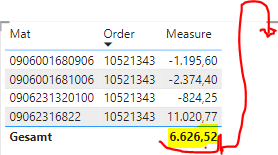
Can anyone help me?
Thanks in advance
- Mark as New
- Bookmark
- Subscribe
- Mute
- Subscribe to RSS Feed
- Permalink
- Report Inappropriate Content
Thank you for your answers.
Unfortunately, I cannot publish any data from my organisation.
Here is an excerpt from my model. It is only about one table. With all the information in the table.
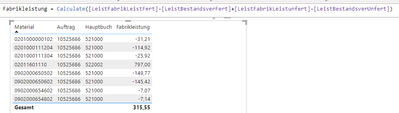
The formulas are just aggregations over a column of my data table:
LeistBestandsverFert = calculate(sumx(Fabrikleistung,Fabrikleistung[Betrag]),Fabrikleistung[Hauptbuch]="522000")
This is what my data table looks like:
| Year | Period | Belegart | Book | Material | Order | Value | BME |
| 2022 | 02 | WE | 522002 | 02011601110 | 10525686 | -797,000 | ST |
| 2022 | 01 | WA | 521000 | 0201000000102 | 10525686 | 31,210 | ST |
| 2022 | 01 | WA | 521000 | 0201000111204 | 10525686 | 114,920 | ST |
| 2022 | 01 | WA | 521000 | 0201000111304 | 10525686 | 25,920 | ST |
| 2022 | 01 | WA | 521000 | 0902000654602 | 10525686 | 7,070 | ST |
| 2022 | 01 | WA | 521000 | 0902000654802 | 10525686 | 7,140 | ST |
| 2022 | 01 | WA | 521000 | 0902000650502 | 10525686 | 149,770 | ST |
| 2022 | 01 | WA | 521000 | 0902000650602 | 10525686 | 145,420 | ST |
As a result, I need a new column that does the following for all order values:
=((Value for Book "522002") - (Value for Book "521002"))
As a result, I have a value of 315.55 in the new column for the order.

@Ashish_Mathur @PhilipTreacy Can you help?


- Mark as New
- Bookmark
- Subscribe
- Mute
- Subscribe to RSS Feed
- Permalink
- Report Inappropriate Content
Hi,
Do you want the result as 315.55 in each row of the Result column? Also, in your measure you have referred to columns which i do not see in your data at all.
Regards,
Ashish Mathur
http://www.ashishmathur.com
https://www.linkedin.com/in/excelenthusiasts/
- Mark as New
- Bookmark
- Subscribe
- Mute
- Subscribe to RSS Feed
- Permalink
- Report Inappropriate Content
My measure is simply an addition or subtraction of the value depending on which book is being addressed.

The result should be displayed in each row of the column because it refers to the order number.
- Mark as New
- Bookmark
- Subscribe
- Mute
- Subscribe to RSS Feed
- Permalink
- Report Inappropriate Content
Just cannot understand your requirement.
Regards,
Ashish Mathur
http://www.ashishmathur.com
https://www.linkedin.com/in/excelenthusiasts/
- Mark as New
- Bookmark
- Subscribe
- Mute
- Subscribe to RSS Feed
- Permalink
- Report Inappropriate Content

With the filter Allselected, I now get the result in every row as desired. However, this only works if I also set an order in the filter. Do you have a solution how I can work around this?
- Mark as New
- Bookmark
- Subscribe
- Mute
- Subscribe to RSS Feed
- Permalink
- Report Inappropriate Content
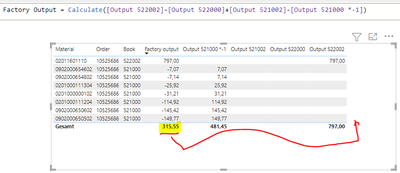
I do not want to have the result of the factor output at the bottom of the totals column. It should be in a new column in each row.
- Mark as New
- Bookmark
- Subscribe
- Mute
- Subscribe to RSS Feed
- Permalink
- Report Inappropriate Content
Hi,
Share the download link of the PBI file.
Regards,
Ashish Mathur
http://www.ashishmathur.com
https://www.linkedin.com/in/excelenthusiasts/

- Mark as New
- Bookmark
- Subscribe
- Mute
- Subscribe to RSS Feed
- Permalink
- Report Inappropriate Content
Hi @Anonymous
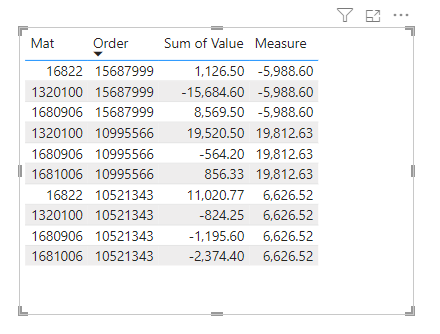
I don't have access to your file and hence your measure, but you could use this to sum the value per order
Measure = CALCULATE(SUM('DataTable'[Value]), FILTER(ALL('DataTable'), 'DataTable'[Order] = SELECTEDVALUE('DataTable'[Order])))
Giving this
Regards
Phil
Did I answer your question? Then please mark my post as the solution.
If I helped you, click on the Thumbs Up to give Kudos.
Blog :: YouTube Channel :: Connect on Linkedin
Proud to be a Super User!
Helpful resources

Power BI Dataviz World Championships
The Power BI Data Visualization World Championships is back! Get ahead of the game and start preparing now!

Power BI Monthly Update - December 2025
Check out the December 2025 Power BI Holiday Recap!

FabCon Atlanta 2026
Join us at FabCon Atlanta, March 16-20, for the ultimate Fabric, Power BI, AI and SQL community-led event. Save $200 with code FABCOMM.

| User | Count |
|---|---|
| 41 | |
| 38 | |
| 36 | |
| 31 | |
| 28 |


| User | Count |
|---|---|
| 129 | |
| 88 | |
| 79 | |
| 68 | |
| 63 |


