cancel
Showing results for 
Search instead for 
Did you mean: 

Get Fabric Certified for FREE during Fabric Data Days. Don't miss your chance! Request now

Reply
jessicavshark19
New Member

Sum of Positive Numbers in Row (find debit and credit)

Hello, I am trying to add up all of the positive numbers in a row to find the debit amount and then all of the negative numbers to find the credit amount. What formula can I use in Power BI to figure this out?  


In this example I am trying to calculate the Credit and Debit columns based off of the first 5 columns. Thank you!


Account Name   0 to 30 days       31 to 60 days   61 to 90 days    91 to 120 days    >120 days          Credit          Debit

Account 1                 $150                     $500                 $100                   -$450                -$300                SUM OF -      SUM OF +

Account 2                -$200                     $300                 -$250                  -$100               $400                  -$550              $500

1 ACCEPTED SOLUTION

I ended up doing this:


credit = sumx(Filter('Table', 'Table'[61 to 90 (days)]<0), 'Table'[61 to 90 (days)])
+sumx(filter('Table', 'Table'[91 to 120 (days)]<0), 'Table'[91 to 120 (days)])
+sumx(filter('Table', 'Table'[121 to 150 (days)]<0), 'Table'[121 to 150 (days)])
+sumx(filter('Table', 'Table'[151 to 180 (days)]<0), 'Table'[151 to 180 (days)])
+sumx(filter('Table', 'Table'[181 to 240 (days)]<0), 'Table'[181 to 240 (days)])
+sumx(filter('Table', 'Table'[> 240 (days)]<0), 'Table'[> 240 (days)])


And it seems to be working! The filter was the key, it just needed a ton of them. Thank you for the advice!

View solution in original post

4 REPLIES 4
kkapsokavadis
Frequent Visitor

Hello, try this


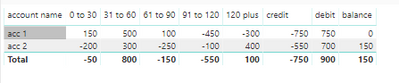
credit = if(sum(Sheet1[0 to 30])<0,sum(Sheet1[0 to 30]))+if(sum(Sheet1[31 to 60])<0,sum(Sheet1[31 to 60]))+if(sum(Sheet1[61 to 90])<0,sum(Sheet1[61 to 90]))+if(sum(Sheet1[91 to 120])<0,sum(Sheet1[91 to 120]))+if(sum(Sheet1[120 plus])<0,sum(Sheet1[120 plus]))


debit = if(sum(Sheet1[0 to 30])>0,sum(Sheet1[0 to 30]))+if(sum(Sheet1[31 to 60])>0,sum(Sheet1[31 to 60]))+if(sum(Sheet1[61 to 90])>0,sum(Sheet1[61 to 90]))+if(sum(Sheet1[91 to 120])>0,sum(Sheet1[91 to 120]))+if(sum(Sheet1[120 plus])>0,sum(Sheet1[120 plus]))


balance = sum(Sheet1[0 to 30])+SUM(Sheet1[31 to 60])+sum(Sheet1[61 to 90])+sum(Sheet1[91 to 120])+sum(Sheet1[120 plus])


Credit_debit.PNG

Anonymous
Not applicable

Hi,


Try using FILTER wrapped within a CALCULATE statement.  For example,


Credit  = CALCULATE ( SUM ( Sales[Value] ) , FILTER ( Sales , Sales[Value] >0))

Debit =  CALCULATE ( SUM ( Sales[Value] ) , FILTER ( Sales , Sales[Value] < 0))

I ended up doing this:


credit = sumx(Filter('Table', 'Table'[61 to 90 (days)]<0), 'Table'[61 to 90 (days)])
+sumx(filter('Table', 'Table'[91 to 120 (days)]<0), 'Table'[91 to 120 (days)])
+sumx(filter('Table', 'Table'[121 to 150 (days)]<0), 'Table'[121 to 150 (days)])
+sumx(filter('Table', 'Table'[151 to 180 (days)]<0), 'Table'[151 to 180 (days)])
+sumx(filter('Table', 'Table'[181 to 240 (days)]<0), 'Table'[181 to 240 (days)])
+sumx(filter('Table', 'Table'[> 240 (days)]<0), 'Table'[> 240 (days)])


And it seems to be working! The filter was the key, it just needed a ton of them. Thank you for the advice!

Mond
Helper III
Helper III

Hi,


Can you create

Debit Measure = sum ( if [0 to 30 days] < 0 ;[measure])+ sum ( if [31 to 60 days] < 0 ;[measure])+.....

Credit Measure = sum ( if [0 to 30 days] >= 0 ;[measure])+ sum ( if [31 to 60 days] >= 0 ;[measure])+.....


Does it help ??


Thanks

Helpful resources

Announcements
November Power BI Update Carousel

Power BI Monthly Update - November 2025

Check out the November 2025 Power BI update to learn about new features.

Fabric Data Days Carousel

Fabric Data Days

Advance your Data & AI career with 50 days of live learning, contests, hands-on challenges, study groups & certifications and more!

FabCon Atlanta 2026 carousel

FabCon Atlanta 2026

Join us at FabCon Atlanta, March 16-20, for the ultimate Fabric, Power BI, AI and SQL community-led event. Save $200 with code FABCOMM.

Top Solution Authors
Top Kudoed Authors