cancel
Showing results for 
Search instead for 
Did you mean: 

The Power BI Data Visualization World Championships is back! Get ahead of the game and start preparing now! Learn more

Reply
jessicavshark19
New Member

Sum of Positive Numbers in Row (find debit and credit)

Hello, I am trying to add up all of the positive numbers in a row to find the debit amount and then all of the negative numbers to find the credit amount. What formula can I use in Power BI to figure this out?  


In this example I am trying to calculate the Credit and Debit columns based off of the first 5 columns. Thank you!


Account Name   0 to 30 days       31 to 60 days   61 to 90 days    91 to 120 days    >120 days          Credit          Debit

Account 1                 $150                     $500                 $100                   -$450                -$300                SUM OF -      SUM OF +

Account 2                -$200                     $300                 -$250                  -$100               $400                  -$550              $500

1 ACCEPTED SOLUTION

I ended up doing this:


credit = sumx(Filter('Table', 'Table'[61 to 90 (days)]<0), 'Table'[61 to 90 (days)])
+sumx(filter('Table', 'Table'[91 to 120 (days)]<0), 'Table'[91 to 120 (days)])
+sumx(filter('Table', 'Table'[121 to 150 (days)]<0), 'Table'[121 to 150 (days)])
+sumx(filter('Table', 'Table'[151 to 180 (days)]<0), 'Table'[151 to 180 (days)])
+sumx(filter('Table', 'Table'[181 to 240 (days)]<0), 'Table'[181 to 240 (days)])
+sumx(filter('Table', 'Table'[> 240 (days)]<0), 'Table'[> 240 (days)])


And it seems to be working! The filter was the key, it just needed a ton of them. Thank you for the advice!

View solution in original post

4 REPLIES 4
kkapsokavadis
Frequent Visitor

Hello, try this


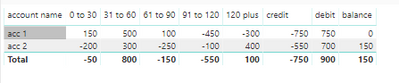
credit = if(sum(Sheet1[0 to 30])<0,sum(Sheet1[0 to 30]))+if(sum(Sheet1[31 to 60])<0,sum(Sheet1[31 to 60]))+if(sum(Sheet1[61 to 90])<0,sum(Sheet1[61 to 90]))+if(sum(Sheet1[91 to 120])<0,sum(Sheet1[91 to 120]))+if(sum(Sheet1[120 plus])<0,sum(Sheet1[120 plus]))


debit = if(sum(Sheet1[0 to 30])>0,sum(Sheet1[0 to 30]))+if(sum(Sheet1[31 to 60])>0,sum(Sheet1[31 to 60]))+if(sum(Sheet1[61 to 90])>0,sum(Sheet1[61 to 90]))+if(sum(Sheet1[91 to 120])>0,sum(Sheet1[91 to 120]))+if(sum(Sheet1[120 plus])>0,sum(Sheet1[120 plus]))


balance = sum(Sheet1[0 to 30])+SUM(Sheet1[31 to 60])+sum(Sheet1[61 to 90])+sum(Sheet1[91 to 120])+sum(Sheet1[120 plus])


Credit_debit.PNG

Anonymous
Not applicable

Hi,


Try using FILTER wrapped within a CALCULATE statement.  For example,


Credit  = CALCULATE ( SUM ( Sales[Value] ) , FILTER ( Sales , Sales[Value] >0))

Debit =  CALCULATE ( SUM ( Sales[Value] ) , FILTER ( Sales , Sales[Value] < 0))

I ended up doing this:


credit = sumx(Filter('Table', 'Table'[61 to 90 (days)]<0), 'Table'[61 to 90 (days)])
+sumx(filter('Table', 'Table'[91 to 120 (days)]<0), 'Table'[91 to 120 (days)])
+sumx(filter('Table', 'Table'[121 to 150 (days)]<0), 'Table'[121 to 150 (days)])
+sumx(filter('Table', 'Table'[151 to 180 (days)]<0), 'Table'[151 to 180 (days)])
+sumx(filter('Table', 'Table'[181 to 240 (days)]<0), 'Table'[181 to 240 (days)])
+sumx(filter('Table', 'Table'[> 240 (days)]<0), 'Table'[> 240 (days)])


And it seems to be working! The filter was the key, it just needed a ton of them. Thank you for the advice!

Mond
Helper III
Helper III

Hi,


Can you create

Debit Measure = sum ( if [0 to 30 days] < 0 ;[measure])+ sum ( if [31 to 60 days] < 0 ;[measure])+.....

Credit Measure = sum ( if [0 to 30 days] >= 0 ;[measure])+ sum ( if [31 to 60 days] >= 0 ;[measure])+.....


Does it help ??


Thanks

Helpful resources

Announcements
Power BI DataViz World Championships

Power BI Dataviz World Championships

The Power BI Data Visualization World Championships is back! Get ahead of the game and start preparing now!

December 2025 Power BI Update Carousel

Power BI Monthly Update - December 2025

Check out the December 2025 Power BI Holiday Recap!

FabCon Atlanta 2026 carousel

FabCon Atlanta 2026

Join us at FabCon Atlanta, March 16-20, for the ultimate Fabric, Power BI, AI and SQL community-led event. Save $200 with code FABCOMM.