Get certified for free when you join Fabric Data Days 2026 and dive into Fabric, Power BI, SQL, AI, and other essential data skills.
Join nowData Days is here! Join us now for 60+ days of learning, challenges, and connection. Learn more
We have a table with unique rows containing: File Number, Lock Start Date, Funded Date, Loan Amount.
We are trying to create a visual that only shows the total count of how many files with the sum of their loan amounts are locked but not funded over a weekly history. In the picture below the top four rows are the data we have in our table. And below that would be an example of what we are trying to visualize.
Any help is very much appreciated!! Thanks!
Hi @jeremypmr
I don't understand the rule of your output.
for example, file number 1, start from 2018/12/1 to 2018/12/30
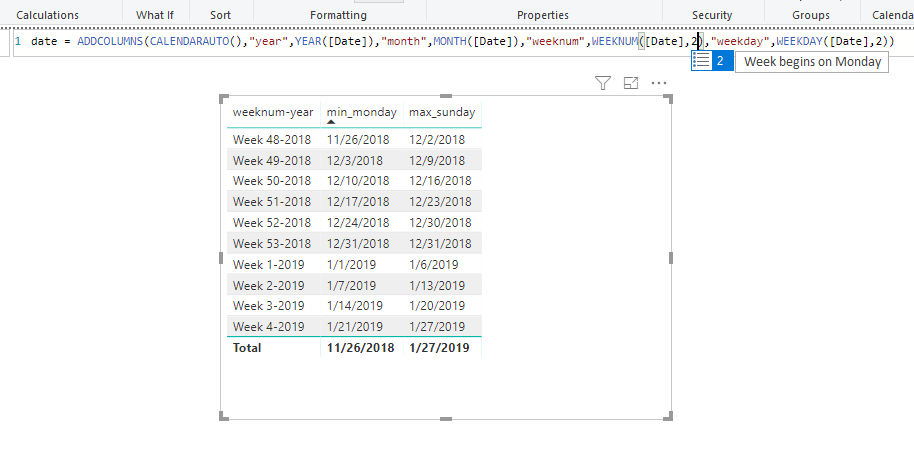
it should go from week 48 to week 52, but in your output, it only goes from week 49 to week 51.
Best Regards
Maggie
Sorry Maggie, The example wasn't accurate it was just scratched up to get teh idea across. Your rule is what we are looking for. Thanks!
Hi @jeremypmr
Since we are in different timezone, could you show example of your week start date and end date?
For example, in my test, week begins from Monday and ends at Sunday
Best Regards
Maggie
I haven't fully built that part yet. This is the path I was going down but I like yours better:)
Week start would be Monday like you have it:) Thanks so much!
Don't miss out on Data Days, June 15 through August 7. Learn Fabric, Power BI, SQL, AI and more.
Check out the May 2026 Power BI update to learn about new features.
| User | Count |
|---|---|
| 23 | |
| 21 | |
| 20 | |
| 18 | |
| 13 |
| User | Count |
|---|---|
| 58 | |
| 50 | |
| 38 | |
| 31 | |
| 27 |