FabCon is coming to Atlanta
Join us at FabCon Atlanta from March 16 - 20, 2026, for the ultimate Fabric, Power BI, AI and SQL community-led event. Save $200 with code FABCOMM.
Register now!- Power BI forums
- Get Help with Power BI
- Desktop
- Service
- Report Server
- Power Query
- Mobile Apps
- Developer
- DAX Commands and Tips
- Custom Visuals Development Discussion
- Health and Life Sciences
- Power BI Spanish forums
- Translated Spanish Desktop
- Training and Consulting
- Instructor Led Training
- Dashboard in a Day for Women, by Women
- Galleries
- Data Stories Gallery
- Themes Gallery
- Contests Gallery
- QuickViz Gallery
- Quick Measures Gallery
- Visual Calculations Gallery
- Notebook Gallery
- Translytical Task Flow Gallery
- TMDL Gallery
- R Script Showcase
- Webinars and Video Gallery
- Ideas
- Custom Visuals Ideas (read-only)
- Issues
- Issues
- Events
- Upcoming Events
The Power BI Data Visualization World Championships is back! Get ahead of the game and start preparing now! Learn more
- Power BI forums
- Forums
- Get Help with Power BI
- Desktop
- Re: Sum a multiplication with if
- Subscribe to RSS Feed
- Mark Topic as New
- Mark Topic as Read
- Float this Topic for Current User
- Bookmark
- Subscribe
- Printer Friendly Page

- Mark as New
- Bookmark
- Subscribe
- Mute
- Subscribe to RSS Feed
- Permalink
- Report Inappropriate Content
Sum a multiplication with if
Hi everyone,
I am a newbie at Power BI, very used to Qlik but have to change software.
I have an issue with a formula of that type : sum(quantity*if(cost_a<>0;cost_a;cost_b)). To do that, I have 2 tables :
- TRANSACTION
- ARTICLES
as shown below
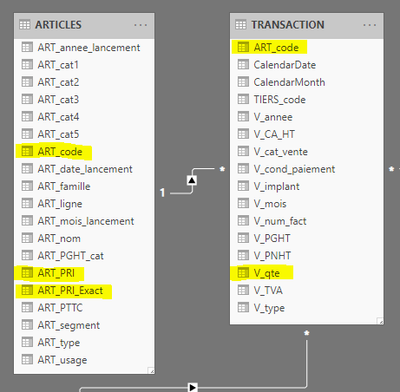
I highlighted the column needed for the calculation. I then want to have the result of course for each product but also for each type of client (as you can see, the column is sadly empty) :
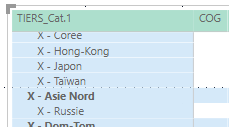
I tried to combine the IF function with the SUM, the SUM with FILTER, and didn't succeed to anything. I guess I don't know how to use the IF function properly. If anyone could help me on that issue, it would be great !
Thank you very much for your help,
Delphine
Solved! Go to Solution.


- Mark as New
- Bookmark
- Subscribe
- Mute
- Subscribe to RSS Feed
- Permalink
- Report Inappropriate Content
@Anonymous Try like. maxx
 sumx(SUMMARIZE(ARTICLES;ARTICLES[ART_code];"M1";maxx(ARTICLES;if('ARTICLES'[ART_PRI]<>0; 'ARTICLES'[ART_PRI];'ARTICLES'[ART_PRI_Exact]));
 "M2";sum('TRANSACTION'[V_qte]));[M1]*[M2])
- Mark as New
- Bookmark
- Subscribe
- Mute
- Subscribe to RSS Feed
- Permalink
- Report Inappropriate Content
@Anonymous
Try combine with your actual model, I am not clear of how is your model looks like but try something like this:
Measure =
var costtable = SUMMARIZE('Transaction','Transaction'[ART_code], 'Transaction'[Product], 'Transaction'[Client Type],'Transaction'[Cost a], 'Transaction'[Cost b],"Cost", IF('Transaction'[Cost a]<>0,'Transaction'[Cost a],'Transaction'[Cost b]))

Return SUMX(ALLEXCEPT(costtable,[product],[client type]),'Transaction'[Quantity]*[Cost])
The idea is create a column of actual cost, you can store it in the measure like above using Summarize, or just create a calculated column in the transaction table:
cost column= IF('Transaction'[Cost a]<>0,'Transaction'[Cost a],'Transaction'[Cost b])

measure = SUMX(ALLEXCEPT('Transaction',[product],[client type]),[Quantity]*cost column)
Paul Zheng
If this post helps, then please consider Accept it as the solution to help the other members find it more quickly.
- Mark as New
- Bookmark
- Subscribe
- Mute
- Subscribe to RSS Feed
- Permalink
- Report Inappropriate Content
Hi @Anonymous ,
thank you for your answer, I get your idea, but why should I need to create a new table to be able to perform that formula or create a new column in the original table ? I think it complexifies the model by repeating a piece of information already existing. in Qlik, the formula is as follow :
sum({$<V_annee={'$(=max(CalendarYear))'},V_type={'*vente*'}>}V_qte*if(ART_PRI<>0,ART_PRI,ART_PRI_Exact))
without any addition to the tables I have nore any new table (even temporary).
If I have no other choice, I will create a new column in my table ARTICLES, but I rather won't.
Thank you very much for your help !
- Mark as New
- Bookmark
- Subscribe
- Mute
- Subscribe to RSS Feed
- Permalink
- Report Inappropriate Content
@Anonymous ,
Try like: sumx(Summmarize(Article[ArtCOde],"M1",maxx(Atricle,if(Art_pri<>0, art_prc,art_pri_excat)),"M2",sum(Trascation[]V_qty)),[M1]*[M2])
- Mark as New
- Bookmark
- Subscribe
- Mute
- Subscribe to RSS Feed
- Permalink
- Report Inappropriate Content
Hi @amitchandak ,
thank you for your answer. I am not sure I understood it. I put :
sumx(SUMMARIZE(ARTICLES;ARTICLES[ART_code];"M1";max(ARTICLES;if('ARTICLES'[ART_PRI]<>0; 'ARTICLES'[ART_PRI];'ARTICLES'[ART_PRI_Exact]));"M2";sum('TRANSACTION'[V_qte]));[M1]*[M2])but I have 2 errors :
- Mark as New
- Bookmark
- Subscribe
- Mute
- Subscribe to RSS Feed
- Permalink
- Report Inappropriate Content
@Anonymous Try like. maxx
 sumx(SUMMARIZE(ARTICLES;ARTICLES[ART_code];"M1";maxx(ARTICLES;if('ARTICLES'[ART_PRI]<>0; 'ARTICLES'[ART_PRI];'ARTICLES'[ART_PRI_Exact]));
 "M2";sum('TRANSACTION'[V_qte]));[M1]*[M2])
- Mark as New
- Bookmark
- Subscribe
- Mute
- Subscribe to RSS Feed
- Permalink
- Report Inappropriate Content
Hi @amitchandak
thank you for your quick answer ! 🙂 I had an error first with MAXX that's why I put only MAXX (did not understand there were 2 different functions, sorry). I have no more error on the measure but it can't be shown on the screen : there is another error "la fin de l'entrée a été atteinte" which could be translated by "the end of the entry has been reached". Any idea ?
thank you very much,
Delphine
- Mark as New
- Bookmark
- Subscribe
- Mute
- Subscribe to RSS Feed
- Permalink
- Report Inappropriate Content
@amitchandak I got it : I am multiplicating a reference with a price... 😥 Let me try to fix it, and I tell you.
- Mark as New
- Bookmark
- Subscribe
- Mute
- Subscribe to RSS Feed
- Permalink
- Report Inappropriate Content
Hi @amitchandak , I tried to do it step by step to understand where could the errors come from and it still doesn't work : even the IF function returns me an error "cannot find name" while I followed the example given there if function dax microsoft docs
if([ART_PRI]<>0;[ART_PRI];[ART_PRI_Exact])and "impossible to have one unique value"
if(ARTICLES[ART_PRI]<>0;ARTICLES[ART_PRI];ARTICLES[ART_PRI_Exact])or
if('ARTICLES'[ART_PRI]<>0;'ARTICLES'[ART_PRI];'ARTICLES'[ART_PRI_Exact])(I still don't understand why sometimes you have ' before and after the name of the table, and sometimes you don't).
The COG calculation is supposed to be one of my simplest calculations, I am quite afraid for the other ones I have to do 😢
thank you very much for your help !
- Mark as New
- Bookmark
- Subscribe
- Mute
- Subscribe to RSS Feed
- Permalink
- Report Inappropriate Content
Hi,
I don't know why, but after a dozen tries, the IF function did work. So here is the formula now :
sumx(SUMMARIZE('ARTICLES';'ARTICLES'[ART_code];"M1";maxx(ARTICLES;if('ARTICLES'[ART_PRI]<>0; 'ARTICLES'[ART_PRI];'ARTICLES'[ART_PRI_Exact]));"M2";SUM('TRANSACTION'[V_qte]));[M2]*[M1])it is a half success.
When I put the measure in front of my articles, I got the expected result (I created a calculated column ART_PRI_calc to check the result) :

but put in front of my client categories, it goes wrong :
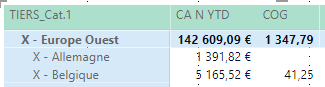
any idea ?
thank you very much !
- Mark as New
- Bookmark
- Subscribe
- Mute
- Subscribe to RSS Feed
- Permalink
- Report Inappropriate Content
Hi,
I think I have a clue: Power BI didn't load my entire table ARTICLES, only half the lines (1300 vs 2500)... I am trying to understand why, because the table is not so big and my table TRANSACTION has been fully loaded while way to big. I deleted and recreated the query numerous times, still doesn't work. Is there a maximum of lines for xlsx files to be imported to Power BI ?
thank you !
- Mark as New
- Bookmark
- Subscribe
- Mute
- Subscribe to RSS Feed
- Permalink
- Report Inappropriate Content
@amitchandak I finally suceeded to load my whole table ARTICLES and your formula did work ! 😁 thank you very much ! I still have to resolve the not-loading issue (I deleted and recreated the query 5 times to make it work, without changing anything, so quite strange for me)
Helpful resources

Power BI Dataviz World Championships
The Power BI Data Visualization World Championships is back! Get ahead of the game and start preparing now!

Power BI Monthly Update - December 2025
Check out the December 2025 Power BI Holiday Recap!

FabCon Atlanta 2026
Join us at FabCon Atlanta, March 16-20, for the ultimate Fabric, Power BI, AI and SQL community-led event. Save $200 with code FABCOMM.

| User | Count |
|---|---|
| 41 | |
| 39 | |
| 37 | |
| 29 | |
| 24 |


| User | Count |
|---|---|
| 119 | |
| 100 | |
| 72 | |
| 69 | |
| 65 |


