
Join us at FabCon Atlanta from March 16 - 20, 2026, for the ultimate Fabric, Power BI, AI and SQL community-led event. Save $200 with code FABCOMM.
Register now!Get Fabric certified for FREE! Don't miss your chance! Learn more
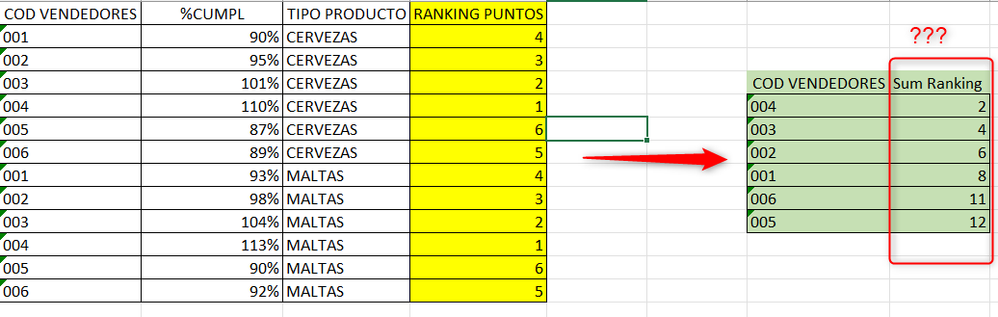
I have this formula for Ranking by Product Type(Cervezas,Maltas) it works very well in a Matrix.
This is the calculation:
Ranking Points =
VAR Tabla =
ADDCOLUMNS(
ALLSELECTED(Transacciones[Tipo Centro]),
"@Monto",[% Variacion])
VAR Resultado =
RANK(
DENSE,
Tabla,
ORDERBY([% Variacion],DESC,Transacciones[Tipo Centro],ASC)
)
RETURN
Resultado
Now I need to add the Ranking by Seller and generate a table or Matriz like the one in green with the sum of the Ranking Points by Seller Code, how could I make that sum of Ranking Value
Solved! Go to Solution.
Hi @mrbajana ,
I apologize for misunderstanding your point.
We can create a measure.
Measure = SUMX(SUMMARIZE('Transacciones',[COD VENDEDORES],"sum ranking",[Ranking Points]),[sum ranking])
Best Regards,
Neeko Tang
If this post helps, then please consider Accept it as the solution to help the other members find it more quickly.
Hi,
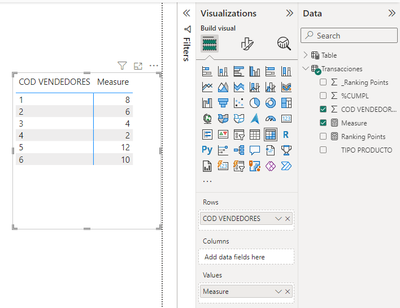
Drag Seller code to the matrix. Add this measure
Measure = SUM(SUMMARIZE(VALUES(Data[COD VENDEDORES]),Data[COD VENDEDORES],"ABCD",[Ranking Puntos]),[ABCD])
Hope this helps.
Hi @mrbajana ,
According to your description, here are my steps you can follow as a solution.
(1) My test data is the same as yours.
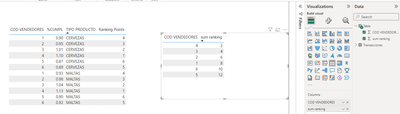
(2) We can create a table.
Table = SUMMARIZE(ALL('Transacciones'),[COD VENDEDORES],"sum ranking",[Ranking Points])
(3) Then the result is as follows.
If the above one can't help you get the desired result, please provide some sample data in your tables (exclude sensitive data) with Text format and your expected result with backend logic and special examples. It is better if you can share a simplified pbix file. Thank you.
Best Regards,
Neeko Tang
If this post helps, then please consider Accept it as the solution to help the other members find it more quickly.
Thank you but I need a Marix and a Mesure , not a table created by dax
Hi @mrbajana ,
I apologize for misunderstanding your point.
We can create a measure.
Measure = SUMX(SUMMARIZE('Transacciones',[COD VENDEDORES],"sum ranking",[Ranking Points]),[sum ranking])
Best Regards,
Neeko Tang
If this post helps, then please consider Accept it as the solution to help the other members find it more quickly.
Share feedback directly with Fabric product managers, participate in targeted research studies and influence the Fabric roadmap.
Check out the January 2026 Power BI update to learn about new features.
| User | Count |
|---|---|
| 68 | |
| 59 | |
| 44 | |
| 20 | |
| 15 |
| User | Count |
|---|---|
| 104 | |
| 102 | |
| 37 | |
| 26 | |
| 26 |