Get Fabric or SQL Certified for Free.
Get certified for free when you join Fabric Data Days 2026 and dive into Fabric, Power BI, SQL, AI, and other essential data skills.
Join now- Power BI forums
- Get Help with Power BI
- Desktop
- Service
- Report Server
- Power Query
- Mobile Apps
- Developer
- DAX Commands and Tips
- Custom Visuals Development Discussion
- Health and Life Sciences
- Power BI Spanish forums
- Translated Spanish Desktop
- Training and Consulting
- Instructor Led Training
- Dashboard in a Day for Women, by Women
- Galleries
- Data Stories Gallery
- Themes Gallery
- Contests Gallery
- QuickViz Gallery
- Quick Measures Gallery
- Visual Calculations Gallery
- Fabric Apps Gallery
- Notebook Gallery
- Translytical Task Flow Gallery
- TMDL Gallery
- R Script Showcase
- Webinars and Video Gallery
- Ideas
- Custom Visuals Ideas (read-only)
- Issues
- Issues
- Events
- Upcoming Events
July 28 - August 9 | Final Round of the Power BI Dataviz World Championships. This is your chance. Learn more
- Power BI forums
- Forums
- Get Help with Power BI
- Desktop
- Re: Sum - Headcount
- Subscribe to RSS Feed
- Mark Topic as New
- Mark Topic as Read
- Float this Topic for Current User
- Bookmark
- Subscribe
- Printer Friendly Page


- Mark as New
- Bookmark
- Subscribe
- Mute
- Subscribe to RSS Feed
- Permalink
- Report Inappropriate Content
Sum - Headcount
Hi
I'm trying to create a calculated column which gives a current headcount at the end of each month.
I've managed to create a table which has the amount of starters and leavers for each month. A result of this is that those without a leave date (i.e. still an active employee) have been lumped into one number totalling 313. And I think this is why I can't simply sum the Net column to get the current headcount at the end of each month.
Thanks and any help greatly appreciated!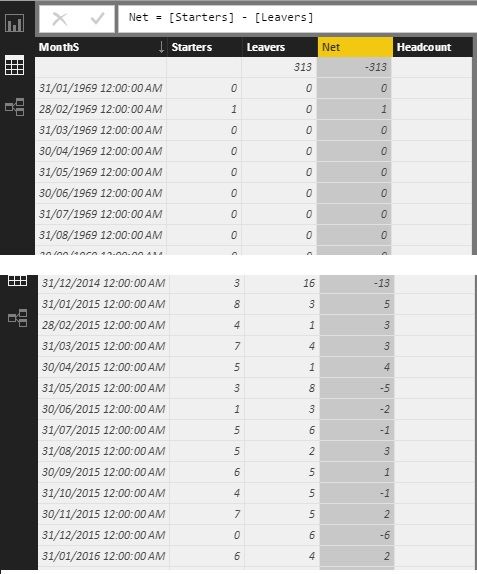
Solved! Go to Solution.


- Mark as New
- Bookmark
- Subscribe
- Mute
- Subscribe to RSS Feed
- Permalink
- Report Inappropriate Content
I assume you use "merge queries" with full join to create this table so that those "not match" rows will aggregate together.
In this scenario, I suggest you filter those "not match" rows in your table. You can filter empty rows in Query Editor.

If you don't want to modify the table, you can add filter expression in your calculation.
Headcount =
CALCULATE(
SUM(MonthlyStartersAndLeavers[Net]),
FILTER (
        ALL ( 'MonthlyStartersAndLeavers'[Months] ),
        'MonthlyStartersAndLeavers'[Months]<>BLANK()
    ),
FILTER(ALL(DateTable[DateKey]),DateTable[DateKey]<=MAX(DateTable[DateKey]))
)
- Mark as New
- Bookmark
- Subscribe
- Mute
- Subscribe to RSS Feed
- Permalink
- Report Inappropriate Content
Alternatively I've calculated the headcount as a measure, using the below formula, but the -313 is still taken into account.
Headcount = CALCULATE(SUM(MonthlyStartersAndLeavers[Net]),FILTER(ALL(DateTable[DateKey]),DateTable[DateKey]<=MAX(DateTable[DateKey])))
- Mark as New
- Bookmark
- Subscribe
- Mute
- Subscribe to RSS Feed
- Permalink
- Report Inappropriate Content
I assume you use "merge queries" with full join to create this table so that those "not match" rows will aggregate together.
In this scenario, I suggest you filter those "not match" rows in your table. You can filter empty rows in Query Editor.
If you don't want to modify the table, you can add filter expression in your calculation.
Headcount =
CALCULATE(
SUM(MonthlyStartersAndLeavers[Net]),
FILTER (
        ALL ( 'MonthlyStartersAndLeavers'[Months] ),
        'MonthlyStartersAndLeavers'[Months]<>BLANK()
    ),
FILTER(ALL(DateTable[DateKey]),DateTable[DateKey]<=MAX(DateTable[DateKey]))
)
- Mark as New
- Bookmark
- Subscribe
- Mute
- Subscribe to RSS Feed
- Permalink
- Report Inappropriate Content


- Mark as New
- Bookmark
- Subscribe
- Mute
- Subscribe to RSS Feed
- Permalink
- Report Inappropriate Content
or, off the cuff, how about at the Visual level doing a running total of the Net column?
- Mark as New
- Bookmark
- Subscribe
- Mute
- Subscribe to RSS Feed
- Permalink
- Report Inappropriate Content
Thanks for the suggestion @CahabaData, but I'm going to need to be using the headcount to create other measures in the future.


- Mark as New
- Bookmark
- Subscribe
- Mute
- Subscribe to RSS Feed
- Permalink
- Report Inappropriate Content
I would create a Month column, something like MONTH([MonthS]) and then edit your column so that [Net] is per row. Then, you could just create a table, place [Month] and [Net] in the table and you should get your answer.
Follow on LinkedIn
@ me in replies or I'll lose your thread!!!
Instead of a Kudo, please vote for this idea
Become an expert!: Enterprise DNA
External Tools: MSHGQM
YouTube Channel!: Microsoft Hates Greg
Latest book!: DAX For Humans
DAX is easy, CALCULATE makes DAX hard...
- Mark as New
- Bookmark
- Subscribe
- Mute
- Subscribe to RSS Feed
- Permalink
- Report Inappropriate Content
Thanks for the response @Greg_Deckler.
Your solution should work out but is there anyway to keep this within my current table?

Helpful resources

Fabric Community Sticker Challenge - Barcelona 2026
If you love stickers, then you will definitely want to check out our community sticker challenge, Barcelona edition!

Power BI Monthly Update - July 2026
Check out the July 2026 Power BI update to learn about new features.

Power BI DataViz World Championships - June 2026
A new Power BI DataViz World Championship is coming this June! Don't miss out on submitting your entry.

| User | Count |
|---|---|
| 26 | |
| 22 | |
| 22 | |
| 20 | |
| 18 |


| User | Count |
|---|---|
| 35 | |
| 28 | |
| 21 | |
| 19 | |
| 17 |


