Get certified for free when you join Fabric Data Days 2026 and dive into Fabric, Power BI, SQL, AI, and other essential data skills.
Join nowJuly 7 - July 17 | Round 2 of the Power BI Dataviz World Championships. Don't miss your chance! Learn more
Hello
I needed a bit of help suming a column by distinct filters.
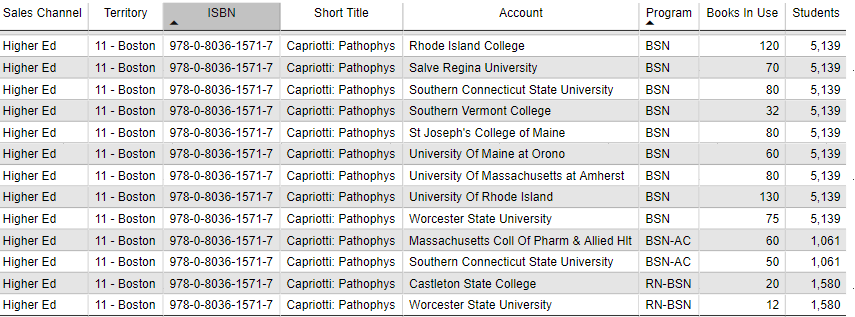
Please see below image.
I would like to write a measure that totals number of students by territory and by program. The number of students would change depending on Territory and by Program selected via my slicers.
So what I would like my Students column total to be is 7,780 (5,139 + 1,061 + 1,580).
Not having much luck using a calculated function.
Any ideas?
Thanks
Solved! Go to Solution.
I just tried this out and I am currently testing as it seems to work.
Measure = MAXX(DISTINCT(Table1[Country]),MAX(Table1[Weight]))
SumWeight = SUMX(DISTINCT(Table1[Country]),[Measure])
can you please post some sample data (you can directly copy data from excel and paste here)
Not totally sure how to do this. As this is from Power BI Desktop
I just tried this out and I am currently testing as it seems to work.
Measure = MAXX(DISTINCT(Table1[Country]),MAX(Table1[Weight]))
SumWeight = SUMX(DISTINCT(Table1[Country]),[Measure])
Join us in Barcelona for FabCon and SQLCon, the Fabric, Power BI, SQL, and AI community event. Save €200 with code FABCMTY200.
Join Fabric Data Days 2026: 60 days of free live/on-demand sessions, challenges, study groups, and certification opportunities.
| User | Count |
|---|---|
| 23 | |
| 22 | |
| 18 | |
| 17 | |
| 13 |
| User | Count |
|---|---|
| 63 | |
| 44 | |
| 42 | |
| 40 | |
| 39 |