cancel
Showing results for 
Search instead for 
Did you mean: 

The Power BI Data Visualization World Championships is back! Get ahead of the game and start preparing now! Learn more

Reply
FZOU
Helper IV
Helper IV

Substrac two rows from same column

Hello,

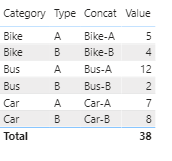
I need some help guys,i have this main table : 

Table.PNG

I need to substract (Bike-A)- (Bike-B) if the result is negative so we display Category which is Bike,Bus,Car, i'll write you an exp :

(Bike-A)- (Bike-B)=1 (Ok)

(Bus-A)- (Bus-B)=10 (Ok)

(Car-A)- (Car-B)=-1<0 so we display the category (Car)


what i did i concate category and type as shown below :

Table-Concat.PNG

i tried several formula but i didn't get the right result,any help please ?

what i need is : if([Bike-A] - [Bike-B]<0 then Bike and the same for other.

Thank you 🙂

1 ACCEPTED SOLUTION
v-janeyg-msft
Community Support
Community Support

Hi, @FZOU 


It’s my pleasure to answer for you.

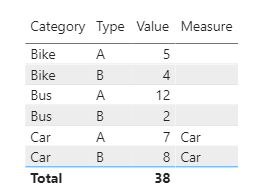
According to your description, I think you can create a measure to calculate the correct result.

Like this:

Measure =
VAR a =
    MAXX (
        FILTER (
            ALL ( Table2 ),
            Table2[Type] <> SELECTEDVALUE ( Table2[Type] )
                && Table2[Category] = SELECTEDVALUE ( Table2[Category] )
        ),
        [Value]
    )
RETURN
    IF (
        SELECTEDVALUE ( Table2[Type] ) = "A"
            && SELECTEDVALUE ( Table2[Value] ) - a < 0
            || SELECTEDVALUE ( Table2[Type] ) = "B"
                && SELECTEDVALUE ( Table2[Value] ) - a > 0,
        SELECTEDVALUE ( Table2[Category] )
    )

v-janeyg-msft_2-1603343544074.png

If it doesn’t solve your problem, please feel free to ask me.


Best Regards

Janey Guo


If this post helps, then please consider Accept it as the solution to help the other members find it more quickly.

View solution in original post

2 REPLIES 2
v-janeyg-msft
Community Support
Community Support

Hi, @FZOU 


It’s my pleasure to answer for you.

According to your description, I think you can create a measure to calculate the correct result.

Like this:

Measure =
VAR a =
    MAXX (
        FILTER (
            ALL ( Table2 ),
            Table2[Type] <> SELECTEDVALUE ( Table2[Type] )
                && Table2[Category] = SELECTEDVALUE ( Table2[Category] )
        ),
        [Value]
    )
RETURN
    IF (
        SELECTEDVALUE ( Table2[Type] ) = "A"
            && SELECTEDVALUE ( Table2[Value] ) - a < 0
            || SELECTEDVALUE ( Table2[Type] ) = "B"
                && SELECTEDVALUE ( Table2[Value] ) - a > 0,
        SELECTEDVALUE ( Table2[Category] )
    )

v-janeyg-msft_2-1603343544074.png

If it doesn’t solve your problem, please feel free to ask me.


Best Regards

Janey Guo


If this post helps, then please consider Accept it as the solution to help the other members find it more quickly.

MFelix
Super User
Super User

Believe this post is duplicated with the one below:


https://community.powerbi.com/t5/Desktop/Substract-two-rows/m-p/1442043#M605621


Regards

Miguel Félix


Did I answer your question? Mark my post as a solution!

Proud to be a Super User!

Check out my blog: Power BI em Português


Helpful resources

Announcements
Power BI DataViz World Championships

Power BI Dataviz World Championships

The Power BI Data Visualization World Championships is back! Get ahead of the game and start preparing now!

December 2025 Power BI Update Carousel

Power BI Monthly Update - December 2025

Check out the December 2025 Power BI Holiday Recap!

FabCon Atlanta 2026 carousel

FabCon Atlanta 2026

Join us at FabCon Atlanta, March 16-20, for the ultimate Fabric, Power BI, AI and SQL community-led event. Save $200 with code FABCOMM.