Join us at FabCon Atlanta from March 16 - 20, 2026, for the ultimate Fabric, Power BI, AI and SQL community-led event. Save $200 with code FABCOMM.
Register now!The Power BI Data Visualization World Championships is back! It's time to submit your entry. Live now!
Hi All,
I have an interesting scenario were I have to Rank Team members based on Team. Below is just an example.
Please help. Thank you!
| Teams | Agents | Score | Rank |
| Team 1 | Agent 8 | 96 | 1 |
| Team 1 | Agent 6 | 40 | 2 |
| Team 1 | Agent 5 | 15 | 3 |
| Team 1 | Agent 18 | 12 | 4 |
| Team 2 | Agent 6 | 78 | 1 |
| Team 2 | Agent 7 | 78 | 1 |
| Team 2 | Agent 4 | 69 | 2 |
| Team 2 | Agent 18 | 17 | 3 |
| Team 3 | Agent 13 | 100 | 1 |
| Team 3 | Agent 20 | 62 | 3 |
| Team 3 | Agent 3 | 78 | 2 |
| Team 4 | Agent 17 | 119 | 1 |
| Team 4 | Agent 15 | 79 | 2 |
| Team 4 | Agent 2 | 52 | 3 |
| Team 4 | Agent 16 | 46 | 4 |
| Team 5 | Agent 7 | 90 | 1 |
| Team 5 | Agent 6 | 79 | 2 |
| Team 5 | Agent 1 | 77 | 3 |
| Team 5 | Agent 17 | 55 | 4 |
| Team 5 | Agent 14 | 43 | 5 |
| Team 5 | Agent 12 | 10 | 6 |
Regards
Sohail
Solved! Go to Solution.
Hi @Sohail
you must create a new column and write
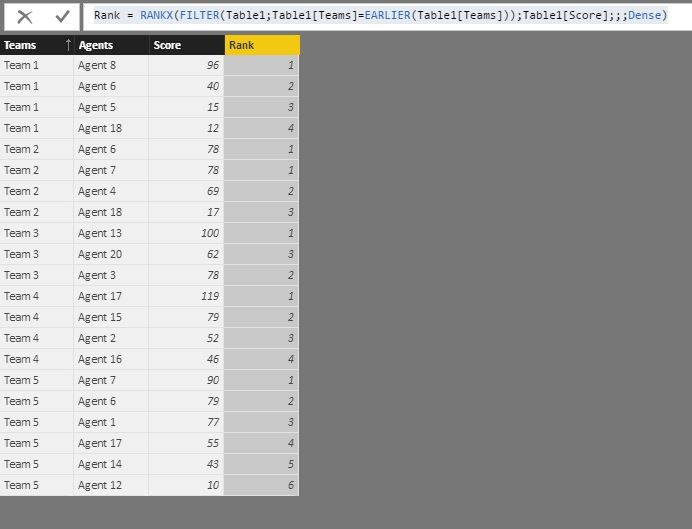
Rank = RANKX(FILTER(Table1;Table1[Teams]=EARLIER(Table1[Teams]));Table1[Score];;;Dense)
and the result is :
Hi @Sohail
you must create a new column and write
Rank = RANKX(FILTER(Table1;Table1[Teams]=EARLIER(Table1[Teams]));Table1[Score];;;Dense)
and the result is :
The Power BI Data Visualization World Championships is back! It's time to submit your entry.
| User | Count |
|---|---|
| 50 | |
| 42 | |
| 36 | |
| 31 | |
| 29 |
| User | Count |
|---|---|
| 129 | |
| 129 | |
| 59 | |
| 48 | |
| 47 |