cancel
Showing results for 
Search instead for 
Did you mean: 

Data Days is here! Join us now for 60+ days of learning, challenges, and connection. Learn more

Reply
Sohail
Advocate IV
Advocate IV

Subcategory Ranking

Hi All,


I have an interesting scenario were I have to Rank Team members based on Team. Below is just an example.

Please help. Thank you!


TeamsAgentsScoreRank
Team 1Agent 8961
Team 1Agent 6402
Team 1Agent 5153
Team 1Agent 18124
Team 2Agent 6781
Team 2Agent 7781
Team 2Agent 4692
Team 2Agent 18173
Team 3Agent 131001
Team 3Agent 20623
Team 3Agent 3782
Team 4Agent 171191
Team 4Agent 15792
Team 4Agent 2523
Team 4Agent 16464
Team 5Agent 7901
Team 5Agent 6792
Team 5Agent 1773
Team 5Agent 17554
Team 5Agent 14435
Team 5Agent 12106


Regards

Sohail

1 ACCEPTED SOLUTION
sokg
Solution Supplier
Solution Supplier

Hi @Sohail


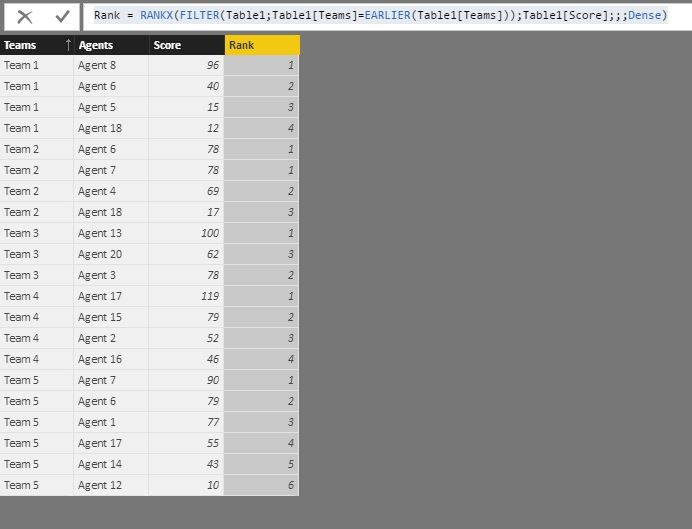
you must create a new column and write


Rank = RANKX(FILTER(Table1;Table1[Teams]=EARLIER(Table1[Teams]));Table1[Score];;;Dense)


and the result is :


Capture.JPG

View solution in original post

2 REPLIES 2
sokg
Solution Supplier
Solution Supplier

Hi @Sohail


you must create a new column and write


Rank = RANKX(FILTER(Table1;Table1[Teams]=EARLIER(Table1[Teams]));Table1[Score];;;Dense)


and the result is :


Capture.JPG

@sokg 


Thank you It's working wondeful.


Regards

Sohail

Helpful resources

Announcements
Fabric Data Days is here Carousel

Fabric Data Days 2026

Don't miss out on Data Days, June 15 through August 7. Learn Fabric, Power BI, SQL, AI and more.

May Power BI Update Carousel

Power BI Monthly Update - May 2026

Check out the May 2026 Power BI update to learn about new features.

Power BI DataViz World Championships carousel

Power BI DataViz World Championships - June 2026

A new Power BI DataViz World Championship is coming this June! Don't miss out on submitting your entry.