Get certified for free when you join Fabric Data Days 2026 and dive into Fabric, Power BI, SQL, AI, and other essential data skills.
Join nowTry your skills in the Power BI Dataviz World Championship! Round one ends June 26. Join now
Hi All,
I have an interesting scenario were I have to Rank Team members based on Team. Below is just an example.
Please help. Thank you!
| Teams | Agents | Score | Rank |
| Team 1 | Agent 8 | 96 | 1 |
| Team 1 | Agent 6 | 40 | 2 |
| Team 1 | Agent 5 | 15 | 3 |
| Team 1 | Agent 18 | 12 | 4 |
| Team 2 | Agent 6 | 78 | 1 |
| Team 2 | Agent 7 | 78 | 1 |
| Team 2 | Agent 4 | 69 | 2 |
| Team 2 | Agent 18 | 17 | 3 |
| Team 3 | Agent 13 | 100 | 1 |
| Team 3 | Agent 20 | 62 | 3 |
| Team 3 | Agent 3 | 78 | 2 |
| Team 4 | Agent 17 | 119 | 1 |
| Team 4 | Agent 15 | 79 | 2 |
| Team 4 | Agent 2 | 52 | 3 |
| Team 4 | Agent 16 | 46 | 4 |
| Team 5 | Agent 7 | 90 | 1 |
| Team 5 | Agent 6 | 79 | 2 |
| Team 5 | Agent 1 | 77 | 3 |
| Team 5 | Agent 17 | 55 | 4 |
| Team 5 | Agent 14 | 43 | 5 |
| Team 5 | Agent 12 | 10 | 6 |
Regards
Sohail
Solved! Go to Solution.
Hi @Sohail
you must create a new column and write
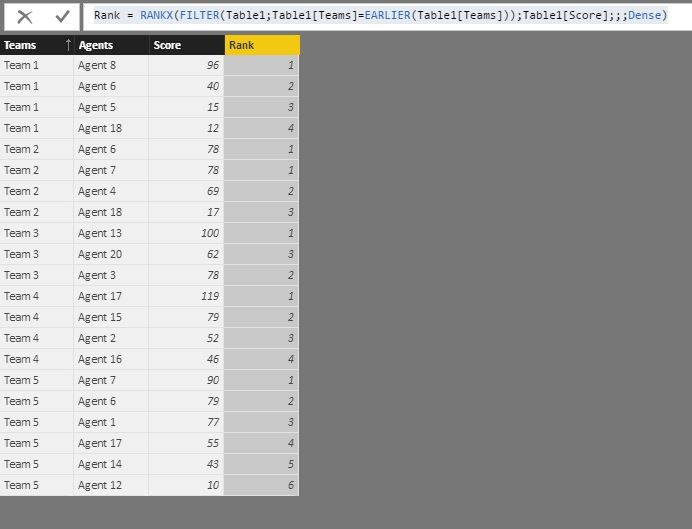
Rank = RANKX(FILTER(Table1;Table1[Teams]=EARLIER(Table1[Teams]));Table1[Score];;;Dense)
and the result is :
Hi @Sohail
you must create a new column and write
Rank = RANKX(FILTER(Table1;Table1[Teams]=EARLIER(Table1[Teams]));Table1[Score];;;Dense)
and the result is :
| User | Count |
|---|---|
| 23 | |
| 21 | |
| 21 | |
| 17 | |
| 11 |
| User | Count |
|---|---|
| 58 | |
| 55 | |
| 43 | |
| 36 | |
| 35 |